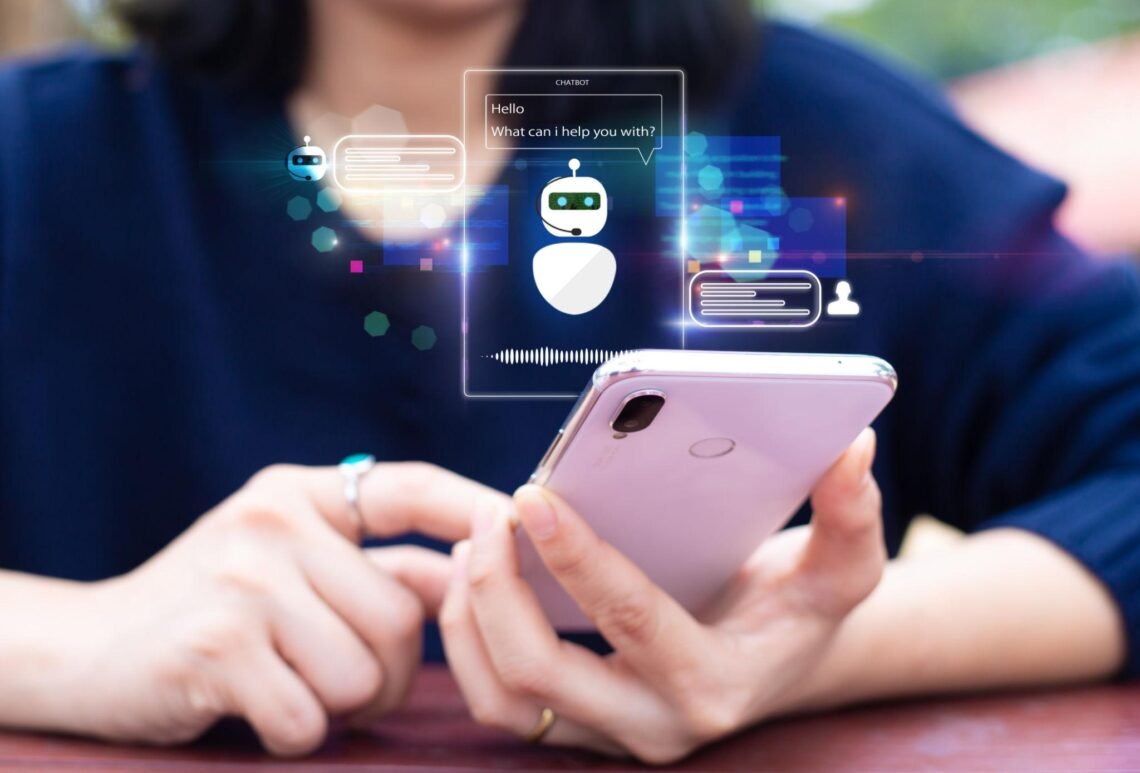
What is an AI chatbot? In simple terms, it is a software application that uses artificial intelligence to understand user messages and generate conversational responses. You interact with it by typing or speaking, much like you would communicate with another person.
AI chatbots are now used in customer support, education, healthcare administration, internal business systems, e-commerce, and many other areas. Some answer simple questions using predefined information, while more advanced systems can understand context, work with documents, use connected tools, and help users complete multi-step tasks.
Understanding how AI chatbots work is useful because not every chatbot is equally capable or reliable. This article explains what an AI chatbot is, how it processes conversations, the technologies behind it, where it is used, and the limitations you should understand before relying on one.
What Is an AI Chatbot?
An AI chatbot is a computer program designed to communicate with people using natural language. It receives a message from a user, processes the meaning of that message, and produces a relevant response.
For example, a user might ask:
“How do I reset my password?”
A basic chatbot may recognize keywords such as “reset” and “password” and provide a prewritten answer.
A more advanced AI chatbot may understand variations of the same request, such as:
- “I can’t access my account.”
- “I forgot my login password.”
- “Where can I change my password?”
The important difference is that AI can help the chatbot interpret language rather than relying entirely on exact words or rigid conversation paths.
Many modern AI chatbots use natural language processing (NLP), machine learning, or large language models (LLMs). The exact technology depends on the chatbot and what it was designed to do.
AI Chatbot vs. Traditional Chatbot
Not every chatbot is truly AI-powered.
Traditional chatbots often follow predefined rules. AI chatbots can use models that interpret language and generate responses more flexibly.
| Feature | Traditional Chatbot | AI Chatbot |
|---|---|---|
| Understands language variations | Limited | Usually better |
| Uses predefined rules | Often | Sometimes |
| Generates original responses | Usually no | Often |
| Handles complex conversations | Limited | Can be more capable |
| Learns from training data | Usually not directly | Often |
| May understand context | Limited | Depends on the system |
For example, imagine a restaurant website.
A traditional chatbot might offer buttons:
- View menu
- Opening hours
- Contact us
An AI chatbot could potentially understand a typed question such as:
“Do you have vegetarian food available on weekends?”
However, the AI chatbot still needs accurate information about the restaurant. Intelligence in language processing does not automatically mean it knows the correct facts.
How Does an AI Chatbot Work?
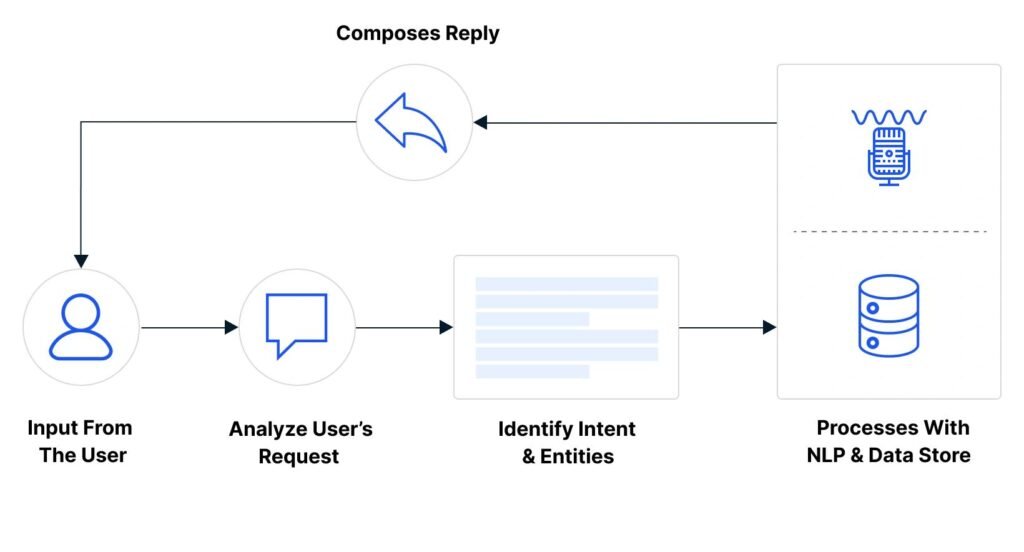
The exact process varies, but an AI chatbot generally follows several stages.
1. The User Sends a Message
The interaction begins when a person types or speaks.
For example:
“Can you recommend a laptop for programming?”
The chatbot receives the message as input.
2. The System Interprets the Request
The chatbot attempts to determine what the user means.
It may identify concepts such as:
- The user wants a recommendation.
- The product is a laptop.
- The intended use is programming.
Modern language models can process the relationship between words and the broader context of the sentence.
3. The Chatbot Uses Available Information
Depending on how it is designed, the chatbot may use:
- Its trained model
- A company knowledge base
- Uploaded documents
- Database information
- Search tools
- External software or APIs
This step is extremely important.
A chatbot that only relies on its underlying model may not have access to current or organization-specific information. A chatbot connected to a knowledge base may retrieve relevant documents before generating its answer.
This approach is often called retrieval-augmented generation, or RAG.
4. The AI Generates or Selects a Response
The system then produces a response based on the user’s message, the conversation context, its instructions, and any relevant information it retrieved.
For a simple support question, the answer may be short:
“You can reset your password by selecting ‘Forgot Password’ on the login page.”
For a more complex question, the chatbot may generate a step-by-step explanation.
5. The Conversation Continues
A useful AI chatbot can consider previous messages when responding.
For example:
User: “Tell me about cloud storage.”
Chatbot: Provides an explanation.
User: “Which option is better for a small business?”
The chatbot needs to understand that “which option” refers to the cloud storage options discussed earlier.
This ability to use previous conversation information is often described as context handling. However, every chatbot has limits on how much context it can process or retain.
The Technologies Behind AI Chatbots
Natural Language Processing
Natural language processing helps computer systems work with human language.
It can support tasks such as:
- Understanding the intent of a question
- Identifying important information
- Classifying messages
- Processing written or spoken language
Earlier chatbot systems often relied heavily on NLP techniques and predefined rules.
Machine Learning
Machine learning allows systems to identify patterns from data.
A chatbot might use machine learning to improve tasks such as intent classification or message categorization.
For example, a support system could learn to recognize that these messages are related:
- “My payment failed.”
- “Why was my card declined?”
- “I couldn’t complete my purchase.”
Large Language Models
Many modern AI chatbots use large language models.
An LLM is trained to process and generate language. Rather than selecting only from a fixed list of responses, it can generate new text based on patterns learned during training and the information provided during a conversation.
This makes conversations more flexible, but it also creates an important limitation: an LLM can sometimes generate information that sounds convincing but is incorrect.

Retrieval and External Tools
Advanced AI chatbots may be connected to other systems.
For example, a chatbot could:
- Search an internal knowledge base.
- Retrieve relevant information.
- Generate an answer based on that information.
It may also use external tools to perform actions, such as checking an order status, creating a support ticket, or retrieving data from a database.
The ability to access tools can make an AI chatbot more useful, but it also requires careful security and permission controls.
Real-World Examples of AI Chatbots
Customer Support
A customer visits an online store and asks:
“Where is my order?”
Instead of providing a generic answer, an AI chatbot connected to the company’s order system could identify the user’s order and return the current status.
This reduces the need for customers to search through multiple pages or wait for a human support agent for simple requests.
However, the chatbot should not invent an order status if it cannot access the relevant system.
Internal Employee Support
A company may have thousands of internal documents covering policies, software, benefits, and procedures.
An AI chatbot can help employees ask questions in natural language, such as:
“How do I request access to the analytics platform?”
The chatbot can search approved internal documentation and provide relevant instructions.
This can make information easier to find, although the quality of the answer depends heavily on the accuracy and maintenance of the underlying documents.
Education and Learning
An AI chatbot can explain concepts, generate practice questions, or provide examples at different levels of difficulty.
For example, a student learning programming might ask:
“Explain a Python function as if I am a beginner.”
The chatbot can adapt the explanation to the requested level.
However, students should verify important answers, especially when the chatbot provides code, calculations, historical facts, or technical explanations that could contain errors.
E-Commerce Assistance
An online retailer could use an AI chatbot to help users narrow down products.
A customer might say:
“I need headphones for video calls and travel.”
The chatbot could ask follow-up questions about budget, preferred features, or compatibility.
The goal is not simply to display products but to guide the customer through a decision.
Healthcare Administration
AI chatbots may assist with administrative tasks such as answering general questions, helping users locate information, or guiding them through appointment-related processes.
However, systems dealing with medical information require particularly careful design. A chatbot should not be treated as a substitute for qualified medical professionals, especially for diagnosis or urgent situations.
IT Help Desks
An employee might report:
“My VPN stopped connecting after I changed my password.”
An AI chatbot could identify relevant troubleshooting steps, search internal documentation, and guide the employee through the process.
If the problem cannot be resolved, the chatbot may collect the necessary information and create a support ticket for a human technician.
Also Read: How to Use Artificial Intelligence in Daily Life
Advantages of AI Chatbots
AI chatbots can provide useful benefits when they are designed for the right tasks.
Faster Access to Information
Users can ask questions directly instead of searching through menus, documentation, or databases.
Availability
A chatbot can be available outside normal business hours, depending on the system and infrastructure supporting it.
More Natural Interactions
People can often describe what they need in their own words instead of learning a specific command structure.
Scalability
A single chatbot system can potentially handle many conversations at the same time.
This can be useful for organizations that receive large numbers of repetitive questions.
Consistency
When connected to well-maintained information sources, a chatbot can provide standardized guidance.
However, consistency does not guarantee correctness. If the underlying information is wrong or outdated, the chatbot may consistently provide the wrong answer.
Automation of Routine Tasks
Some AI chatbots can go beyond answering questions.
With appropriate permissions, they may be able to:
- Create support tickets
- Retrieve account information
- Schedule appointments
- Update records
- Search internal systems
- Trigger automated workflows
Limitations and Risks of AI Chatbots
AI chatbots are useful, but they should not be viewed as systems that automatically understand everything or always provide correct answers.
Incorrect or Fabricated Answers
Generative AI models can sometimes produce false information. This is often called a hallucination.
The answer may sound confident and well-written even when it is inaccurate.
For this reason, important information should be verified, particularly in areas involving:
- Medicine
- Law
- Finance
- Security
- Technical configuration
- Safety
Lack of Real Understanding
An AI chatbot can process and generate language in impressive ways, but that does not necessarily mean it understands the world in the same way a human does.
It may recognize patterns and relationships in language without possessing human judgment, experience, or common sense.
Privacy Concerns
Users should be careful about entering sensitive information into an AI chatbot.
Organizations deploying chatbots should consider:
- What information users can submit
- Where conversations are stored
- Who can access the data
- Whether third-party services process the information
- How long information is retained
Privacy requirements vary by location and industry, so organizations should verify their specific legal and regulatory obligations with appropriate experts.
Outdated Information
A chatbot’s underlying model may not contain current information.
Even a chatbot connected to external information sources can produce outdated answers if those sources are not maintained.
For time-sensitive information, users should verify details with a reliable and up-to-date source.
Security Risks
A chatbot connected to business systems can become a security concern if permissions are poorly designed.
For example, an employee chatbot should not automatically have access to confidential information simply because a user asks for it.
Organizations need controls for authentication, authorization, data access, and monitoring.
Cost and Maintenance
Building an AI chatbot is not always a one-time project.
Costs may include:
- Model usage
- Infrastructure
- Data integration
- Security
- Testing
- Monitoring
- Maintenance
A poorly maintained chatbot can become less useful as company information, products, and policies change.
Common Misconceptions About AI Chatbots
“An AI chatbot always knows the correct answer.”
False. A chatbot can make mistakes or generate inaccurate information.
“Every chatbot uses the same technology.”
False. Some chatbots use rules, while others use machine learning, large language models, retrieval systems, or a combination of technologies.
“AI chatbots replace all human workers.”
Not necessarily.
AI chatbots are often most effective when handling repetitive questions and routine tasks while humans manage complex, sensitive, or unusual situations.
“A chatbot automatically learns from every conversation.”
Not always.
Whether a system learns from user conversations depends on how it was designed and operated. Some systems may store conversations without using them for model training, while others may use data differently according to their policies and settings.
“A more human-sounding chatbot is always better.”
Not necessarily.
A natural conversation can improve usability, but a chatbot should also be clear about its capabilities and limitations. A system that sounds highly confident can create problems if users assume it is always correct.
How Businesses Can Use AI Chatbots Effectively
Before building or deploying an AI chatbot, an organization should identify a specific problem it wants to solve.
A practical process looks like this:
- Identify repetitive or time-consuming requests.
Look for questions that users ask repeatedly. - Determine the information source.
Decide whether the chatbot should use a knowledge base, database, documents, APIs, or other systems. - Define what the chatbot can and cannot do.
Clear boundaries reduce unnecessary errors and security risks. - Test with realistic user questions.
Users often phrase questions differently than developers expect. - Provide a path to human support.
Users should be able to escalate complex or sensitive issues. - Monitor performance.
Review incorrect answers, failed conversations, and common requests. - Keep information updated.
An AI chatbot is only as useful as the information and systems supporting it.
The best AI chatbot is not necessarily the one that can discuss the widest range of topics. For many organizations, a focused chatbot with reliable information is more valuable than a system that attempts to answer everything.
Frequently Asked Questions
What is an AI chatbot in simple words?
An AI chatbot is a software program that uses artificial intelligence to communicate with people through text or voice and respond to questions or requests.
What is the difference between an AI chatbot and a normal chatbot?
A traditional chatbot usually follows predefined rules or conversation paths. An AI chatbot can use technologies such as natural language processing or large language models to understand language more flexibly and generate responses.
How does an AI chatbot understand what I say?
It processes your words and the surrounding context to identify patterns, meaning, and relevant information. The exact method depends on the technology used by the chatbot.
Can an AI chatbot give wrong answers?
Yes. AI chatbots can misunderstand questions, use outdated information, or generate inaccurate responses. Important information should be verified with reliable sources.
Does an AI chatbot learn from every conversation?
Not necessarily. Whether conversations are stored or used for improvement depends on the specific chatbot, its settings, and the policies of the organization operating it.
What can AI chatbots be used for?
They can be used for customer support, employee assistance, education, e-commerce, IT support, information retrieval, and automated workflows.
Is an AI chatbot the same as ChatGPT?
No. ChatGPT is a specific AI product, while “AI chatbot” is a broader category that includes many different types of conversational AI systems.
What is an AI chatbot useful for?
An AI chatbot is useful for answering questions, finding information, guiding users through processes, automating routine tasks, and providing conversational access to software or knowledge.
Conclusion
So, what is an AI chatbot? It is a conversational software system that uses artificial intelligence to process human language and provide responses or perform tasks.
The capabilities of an AI chatbot depend on the technology behind it and the information or tools it can access. Some systems answer simple questions, while others can search documents, retrieve data, use external software, and support more complex workflows.
The most important point is that AI chatbots are not automatically accurate, all-knowing, or appropriate for every situation. Their value depends on reliable information, careful design, strong privacy and security practices, and clear limits on what they are expected to do.
When used thoughtfully, an AI chatbot can make information and services easier to access. When used without proper controls, it can also spread errors, expose sensitive data, or create unnecessary confusion. Understanding both sides is the key to using the technology effectively.