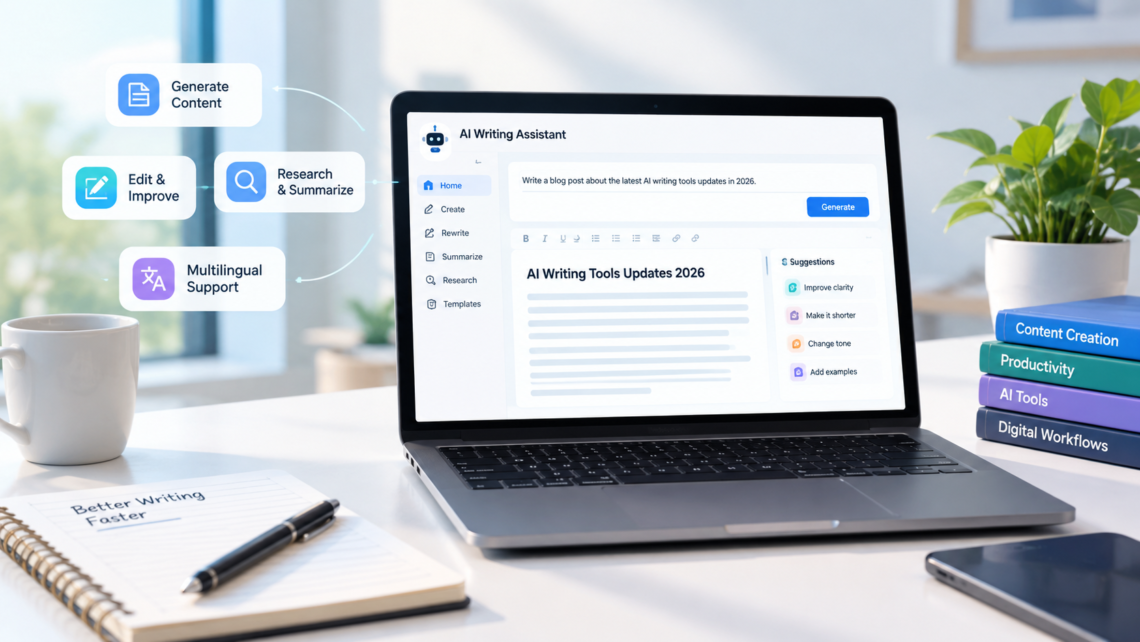
AI writing tools are becoming more than simple text generators. In 2026, the focus is increasingly on helping people research topics, develop ideas, refine drafts, organize information, and produce complete documents with less manual effort. Updates to language models and writing platforms are also changing how users interact with these tools.
For bloggers, students, marketers, businesses, and professional writers, keeping up with AI writing tools updates 2026 can help identify useful new features and avoid paying for capabilities they do not need. However, a newly released feature does not automatically mean better writing, more accurate information, or less editing.
This guide covers the major developments in AI writing tools during 2026, including improvements to writing quality, document creation, research, personalization, and workflow automation. It also explains how to evaluate updates, where the limitations remain, and how to use these tools effectively.
What Are AI Writing Tools?
AI writing tools are software applications that use artificial intelligence to help people create, edit, organize, or improve written content. Most modern tools use large language models (LLMs), which generate text by learning patterns from large collections of data and responding to instructions and context.
Depending on the platform, an AI writing tool may help users:
-
Generate article outlines, first drafts, emails, and reports.
-
Rewrite sentences for clarity, tone, or length.
-
Summarize lengthy documents and research materials.
-
Check grammar, spelling, and readability.
-
Adapt content for different audiences or formats.
-
Brainstorm ideas and develop arguments.
-
Work with information from documents or connected applications.
Some tools specialize in a particular task, such as grammar correction or marketing copy. Others provide a broader workspace that combines writing, research, file analysis, and document creation.
The important distinction is that an AI writing assistant supports the writing process; it does not automatically replace the judgment, knowledge, or responsibility of the person publishing the content.
Major AI Writing Tools Updates in 2026
The most useful developments in 2026 are not limited to new language models. Writing platforms are also changing how users create documents, access research, maintain a consistent voice, and manage repetitive tasks.
The following examples illustrate documented product developments announced during 2026. Availability can vary by subscription, region, application, and rollout schedule.
1. AI Writing Is Moving Into Everyday Document Editors
One significant development is the integration of AI assistants directly into the software people already use for writing.
On September 17, 2026, OpenAI announced ChatGPT for Word. The integration allows users to draft content from notes, summarize documents, revise selected text, and adjust headings and formatting through a sidebar in Microsoft Word. OpenAI states that the add-in is available across ChatGPT plans, including Free, subject to usage limits.
This type of integration changes the writing process. Instead of copying text into a separate AI website, users can work within their existing documents.
For example, a business professional preparing a monthly report could ask an assistant to:
-
Turn meeting notes into a structured first draft.
-
Summarize a lengthy section for executives.
-
Rewrite a paragraph in a more formal tone.
-
Improve headings and document organization.
The writer can then review the suggestions without leaving the document.
Why it matters: Keeping AI assistance close to the original content can reduce unnecessary switching between applications. However, users should still check whether the assistant has interpreted the document correctly and preserved important details.
2. AI Writing Tools Are Becoming More Context-Aware
Earlier writing assistants often worked on a sentence or paragraph in isolation. Newer systems increasingly use information from the surrounding document, previous instructions, or connected sources to produce more relevant responses.
Google’s July 16, 2026, update to Gemini in Google Docs illustrates this direction. Google announced expanded language support for its writing features and described an upgraded Help me create experience that can produce formatted first drafts using information from files, emails, chats, and the web. The update also uses Workspace Intelligence to provide context-aware assistance.
Consider a marketing team preparing an article about a software product. The team may already have product specifications, customer feedback, brand guidelines, and previous campaign materials.
A context-aware assistant can use those materials to help draft an article that reflects the product’s actual features and the company’s preferred style.
This is different from asking a general chatbot to write about the product using only a short prompt.
However, context awareness does not guarantee correctness. If the connected documents contain outdated prices or conflicting specifications, the generated draft may repeat those errors.
3. Writing Assistants Are Expanding Into Full Document Workspaces
Another notable change is the development of dedicated AI-powered writing environments.
Grammarly’s Docs, for example, combines document editing with AI assistance for brainstorming, composition, revision, and research. Its documented features include paragraph rewriting, proofreading, reader feedback, citation discovery, and plagiarism checking.
The practical difference is that writers can move through several stages of a project in one place.
A student preparing a research essay might begin by organizing ideas, develop a draft, improve unclear paragraphs, and identify sources that need closer examination.
A content editor might use similar tools to review an article’s structure, identify unexplained terms, and make the language more accessible.
These features can make revision more organized, but they should not be treated as automatic approval. A suggested citation must be checked against the original source, and a plagiarism checker cannot guarantee that every possible source has been identified.
4. AI Agents Are Taking on Multi-Step Writing Tasks
A conventional writing assistant usually responds to an individual request. An AI agent can be designed to complete a sequence of related tasks, sometimes using connected tools or information sources.
For example, a content workflow might involve:
-
Reviewing a content brief.
-
Gathering information from approved sources.
-
Preparing an outline.
-
Drafting sections in a specified style.
-
Identifying unsupported claims.
-
Preparing a draft for human review.
Not every AI writing product can complete this entire process, and the degree of automation differs between platforms.
Notion’s September 15, 2026, release introduced reusable agent skills for teams. These skills allow teams to encode instructions for recurring tasks, such as generating a monthly business review in a consistent format. Notion also announced controls that let eligible Business and Enterprise workspaces manage which AI models their agents can use.
For content teams, reusable instructions can help standardize recurring work. An editorial skill, for example, could specify preferred heading styles, terminology, and review requirements.
The key is to automate repeatable steps without removing necessary editorial checks.
5. AI Writing Is Becoming More Multilingual
Language support is another important area of development.
In March 2026, Grammarly announced writing support in 17 additional languages. Its broader writing features also include multilingual suggestions and paragraph-level rewriting in supported languages.
Google’s July update to Gemini in Docs added support for 11 more languages, including Malay, Turkish, Indonesian, Dutch, and Mandarin.
These developments can make AI writing more accessible to people who work across languages.
For instance, a small business in Pakistan might prepare an English product description and need a version suitable for customers who prefer another language. An AI assistant can help produce an initial translation and adjust the tone.
But multilingual support is not the same as native-level fluency. Translations may mishandle idioms, cultural references, technical terms, or regional expressions. Important material should be reviewed by someone who understands the target language and audience.
6. AI Writing Tools Are Adding More Control Over Style and Editing
Writers increasingly need more than a generic instruction to “make this better.” They want to control tone, length, audience, structure, and the degree of editing.
Modern writing interfaces offer ways to request specific changes, such as shortening a section, making a passage more formal, or rewriting selected text while preserving its meaning.
Microsoft 365 Copilot’s August 2026 release notes describe mobile features that let users refine pages through natural-language commands, including shortening existing content and creating pages from chat prompts.
These controls are particularly useful when a document already contains valuable material.
For example, a writer who has prepared a 1,000-word explanation might ask an assistant to create a shorter version for a newsletter. The goal is not to generate an entirely new article but to adapt the existing material for a different purpose.
The writer should compare the shortened version with the original to ensure that important qualifications, instructions, or technical details have not disappeared.
AI Writing Tools Updates 2026: A Comparison of Key Developments
The following table summarizes the examples discussed above. It describes documented capabilities rather than ranking the products.
| Tool or Platform | Documented 2026 Development | Potential Use |
|---|---|---|
| ChatGPT for Word | Drafting, summarizing, revision, and formatting in Word | Reports, essays, and business documents |
| Gemini in Google Docs | Expanded language support and context-aware document creation | Drafts based on workplace information |
| Grammarly Docs | Integrated writing, editing, and research assistance | Essays, articles, and proposals |
| Notion AI | Reusable agent skills and model controls | Repeatable team documents |
| Grammarly Multilingual Support | Additional language support | Multilingual writing and editing |
| Microsoft 365 Copilot | Natural-language page editing and creation on mobile | Updating and creating work documents |
These features serve different purposes. A writer who mainly needs grammar correction has different requirements from a team producing research-heavy reports or managing a large content operation.
Before choosing a tool, check the vendor’s current documentation for plan requirements, regional availability, usage limits, and supported applications.
Also Read: AI Contextual Adaptation
How AI Writing Tools Work in 2026
Although individual products differ, most AI writing workflows follow a similar pattern.
Step 1: The user provides instructions and context
The user enters a prompt, uploads a document, selects text, or provides reference material.
A useful prompt identifies the intended audience, purpose, tone, format, and any requirements the output must satisfy.
For example:
“Write a 600-word beginner’s guide to cloud backups. Explain the difference between cloud storage and backup, include two practical examples, and avoid unsupported security claims.”
This gives the assistant a clearer task than simply asking it to write about cloud backups.
Step 2: The model generates or transforms text
The AI model processes the instructions and available context to generate a response. Depending on the task, it may create new content, summarize information, rewrite existing text, or suggest an outline.
The result is a prediction-based output, not an automatic guarantee that every statement is true.
Step 3: Additional tools may retrieve or check information
Some writing workflows can access search, documents, or connected applications. Others operate only on the text supplied by the user.
This distinction matters. A tool that can search for current information may help locate relevant sources, but the user still needs to determine whether those sources are trustworthy and support the claims being made.
Step 4: The writer reviews and edits
The final stage should include checking facts, correcting mistakes, improving transitions, and ensuring the content meets its intended purpose.
This is where human knowledge and editorial judgment remain essential.
Real-World Examples of AI Writing Tools in Use
Example 1: Writing an article for a technology blog
A blogger preparing an article about AI automation could use a writing assistant to organize a brief into sections, identify questions beginners may have, and create an initial draft.
The blogger would then verify product names, technical explanations, release dates, and other factual claims.
The tool helps organize the work, while the writer remains responsible for accuracy and usefulness.
Example 2: Preparing a business report
A manager receives meeting notes, sales summaries, and project updates from several colleagues.
An AI assistant can turn these materials into a structured report with sections for completed work, unresolved issues, and upcoming priorities.
The manager should check the figures, confirm that the summary reflects the original notes, and remove confidential information that should not be shared with an unapproved service.
Example 3: Improving customer support emails
A support representative needs to explain why a customer’s order is delayed.
An AI writing tool can help produce a polite, concise message using the facts provided by the representative. It can also create a shorter version for a messaging application.
The representative must confirm the actual order status and avoid promising a delivery date that the company has not verified.
Example 4: Repurposing existing content
A company has published a detailed technical article and wants to turn it into a newsletter, a short LinkedIn post, and an FAQ.
An AI assistant can adapt the original material into those formats.
The editor should check that each version preserves the original meaning and does not introduce new claims simply to make the formats sound different.
Benefits of the Latest AI Writing Tools
The practical advantages depend on the task, but several benefits are worth considering.
Faster first drafts: AI can turn a clear brief or a collection of notes into a starting point, reducing the time spent facing a blank page.
More efficient editing: Rewriting, summarization, and tone adjustments can make routine revisions quicker.
Consistent formatting: Templates and reusable instructions can help teams follow common document structures.
Support for different audiences: A single explanation can be adapted for beginners, technical readers, customers, or executives.
Reduced application switching: Integrations with document editors allow users to work on text without repeatedly moving between separate tools.
Help with repetitive tasks: Reusable workflows can simplify recurring reports, email formats, and content updates.
These benefits are most noticeable when the task is clearly defined and the writer already understands what a good result should look like.
Limitations and Risks to Consider
AI writing tools have improved, but several problems remain relevant in 2026.
Inaccurate or outdated information
AI-generated content can contain incorrect details, invented references, or outdated product information. This is particularly important for articles about software releases, pricing, regulations, and fast-changing technology.
For current claims, verify the information against reliable, up-to-date sources.
Generic or repetitive writing
A fluent draft may still rely on predictable expressions, broad statements, and repetitive explanations. A human editor should remove unnecessary passages and add specific examples, original insights, and relevant context.
Privacy and confidentiality
Uploading company documents, customer information, unpublished research, or personal data may create privacy risks.
Before using a tool, review its data-handling policies, retention practices, account settings, and organizational requirements. Do not assume that every AI service treats submitted information in the same way.
Costs and usage restrictions
Some advanced capabilities require paid plans or have usage limits. A tool that appears inexpensive may become costly if a team needs multiple subscriptions, higher usage allowances, or enterprise controls.
Compare the total cost with the time and quality improvements the tool actually provides.
Overreliance on automation
Automated writing can produce a polished document that still misses the point. It may misunderstand an audience, remove an important qualification, or make a weak argument sound convincing.
For important content, use AI to support decisions rather than make every editorial decision automatically.
How to Choose an AI Writing Tool in 2026
The right tool depends on what you write, where you work, and how much review your content requires.
Use the following checklist when comparing options:
-
Writing quality: Does it produce clear, relevant drafts with minimal unnecessary text?
-
Editing controls: Can you revise specific passages without rewriting the entire document?
-
Context: Can it work with your own files and reference materials when needed?
-
Research: Does it provide traceable sources for factual claims?
-
Language support: Does it handle your required languages and regional usage?
-
Integrations: Does it work with your preferred editor, browser, or publishing workflow?
-
Privacy: Are its data policies suitable for your work?
-
Pricing: Are the features you need included in your plan?
-
Reliability: Does it preserve meaning and formatting during revisions?
Test a shortlisted tool on a real task before committing to a subscription. Use the same brief, source material, and quality criteria for each product. This makes it easier to identify meaningful differences rather than relying on marketing claims.
Best Practices for Using AI Writing Tools
A reliable workflow combines clear instructions, appropriate source material, and human review.
-
Start with a clear brief. Define the audience, purpose, format, and scope before generating text.
-
Provide trustworthy references. Supply relevant documents or links when accuracy matters.
-
Generate a structure first. Review the outline before asking for a complete draft.
-
Work section by section. This makes it easier to catch misunderstandings and control the writing.
-
Verify factual claims. Check dates, names, statistics, quotations, and technical details against original sources.
-
Edit for your own voice. Replace generic language with specific explanations and examples.
-
Review the final document. Check its accuracy, flow, formatting, and suitability for its audience.
For a website such as a technology knowledge blog, this approach helps maintain editorial consistency without sacrificing accuracy or originality.
Frequently Asked Questions
1. What are the biggest AI writing tools updates in 2026?
Major developments include deeper integration with document editors, context-aware drafting, expanded language support, AI-powered editing workspaces, and reusable agent workflows. Specific features and availability vary by platform.
2. Which AI writing tools have new features in 2026?
Documented developments include ChatGPT for Word, expanded Gemini capabilities in Google Docs, Grammarly’s AI-powered Docs workspace, Notion’s reusable agent skills, and new Microsoft 365 Copilot editing capabilities. Check the official product documentation for current access and plan details.
3. Can AI writing tools write complete articles?
Yes. Many can generate full drafts from a brief. However, a complete draft is not necessarily ready to publish. Research, fact-checking, editing, and original contributions may still be needed.
4. Are AI writing tools free in 2026?
Some tools offer free access, while others reserve certain features for paid subscriptions. Free plans may have limits on usage, models, integrations, or advanced capabilities. Check current pricing before subscribing.
5. Can AI writing tools improve SEO content?
They can help with outlines, search-intent research, readability, FAQs, and content organization. They cannot guarantee rankings. Useful SEO content still needs to answer the reader’s question accurately and provide genuine value.
6. Are AI-generated articles accurate?
Not always. AI systems can produce plausible but incorrect statements or use outdated information. Verify important claims against reliable sources, especially when writing about current events, products, science, or regulations.
7. Will AI writing tools replace human writers?
AI can automate parts of drafting and editing, but writing also involves research judgment, original thinking, subject knowledge, interviews, and responsibility to readers. The extent to which AI changes a particular writing role will depend on the work, industry, and how organizations adopt the technology.
8. How can I keep up with AI writing tools updates in 2026?
Follow official release notes, product blogs, and help centers for the tools you use. Check announcement dates, rollout details, supported plans, and regional restrictions. Test new features on real tasks before changing your workflow.
Conclusion
The most important AI writing tools updates in 2026 reflect a shift from standalone text generation toward integrated writing, research, editing, and workflow assistance. Document editors are adding AI capabilities, writing platforms are becoming more context-aware, and teams are using reusable instructions to manage recurring work.
For writers, the practical opportunity is to spend less time on repetitive tasks and more time on research, judgment, and the quality of the final work.
The key takeaway is simple: choose tools based on the problems they solve, verify their claims and outputs, and keep human editorial review at the center of the process. The value of AI writing is not how much text it produces, but how effectively it helps create content that readers can trust.