Perplexity is best known as an AI search and research platform, but it has expanded beyond text answers to include image generation and image editing. Instead of opening a separate image-generation application, users can describe an image directly in a Perplexity prompt and receive a generated result as part of the conversation.
The interesting part of Perplexity AI image generation capabilities is the connection between image creation and Perplexity’s broader search experience. A user can research a subject, develop an idea, and then ask for a visual that supports that work without necessarily switching tools.
This guide explains what Perplexity can currently generate, which image models it offers, how image creation and editing work, how to write better prompts, where the feature is useful, and what limitations users should understand before relying on it for professional or commercial work.
What Are Perplexity AI Image Generation Capabilities?
Perplexity’s image generation feature allows users to create custom images from natural-language prompts. The process is intentionally simple: describe what you want in the search input, and Perplexity can generate an image based on the request. Perplexity says the feature is available across its web, mobile, and desktop applications, although specific access and limits can depend on the user’s plan.
For example, a prompt could request:
Generate a clean, professional illustration showing how an AI model processes information, with a white background and subtle blue accents.
The important distinction is that Perplexity is not limited to answering a question about an image. It can also create a visual from the user’s description.
This makes image generation useful for things such as:
- Blog illustrations
- Concept visuals
- Presentation graphics
- Marketing ideas
- Educational diagrams
- Social media graphics
- Posters and creative artwork
- Product or interface concepts
- Visual assets for research projects
The exact quality and available features can change as Perplexity updates the image models behind the service, so users should verify the current model and plan availability before making decisions based on older documentation.
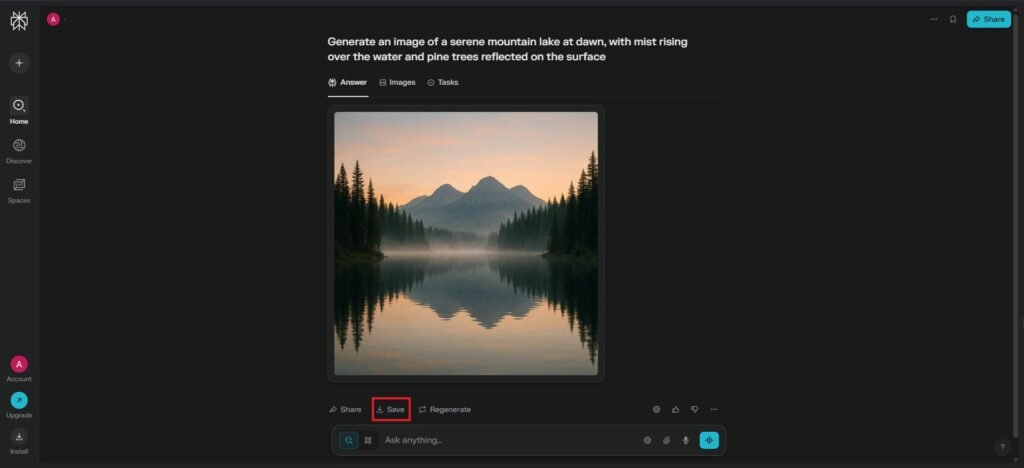
How Does Image Generation Work in Perplexity?
The basic workflow is straightforward.
1. Describe the image
Start by writing a prompt describing the visual you want. Perplexity recommends being specific about details such as the subject, style, colors, mood, and setting.
For example:
Create a minimalist editorial illustration of a cybersecurity analyst monitoring an AI-powered security system, dark blue interface elements, modern office environment, professional technology magazine style.
2. Perplexity generates the image
Rather than requiring a separate image-generation button, Perplexity’s current workflow allows the image request to be made directly through the prompt. The system automatically generates the image when the request is supported.
3. Review the result
The first result may not perfectly match the original idea. Instead of treating the first image as final, users can refine their instructions.
4. Regenerate or refine
Perplexity provides a regeneration option, and users can also continue the conversation with another image-generation prompt. Perplexity notes that regeneration attempts count toward the applicable image-generation limit.
This conversational approach is useful because image creation becomes an iterative process rather than a single prompt-and-download operation.
Which AI Models Does Perplexity Use for Image Generation?
One of the more important aspects of Perplexity’s image-generation system is that it does not rely on a single image model.
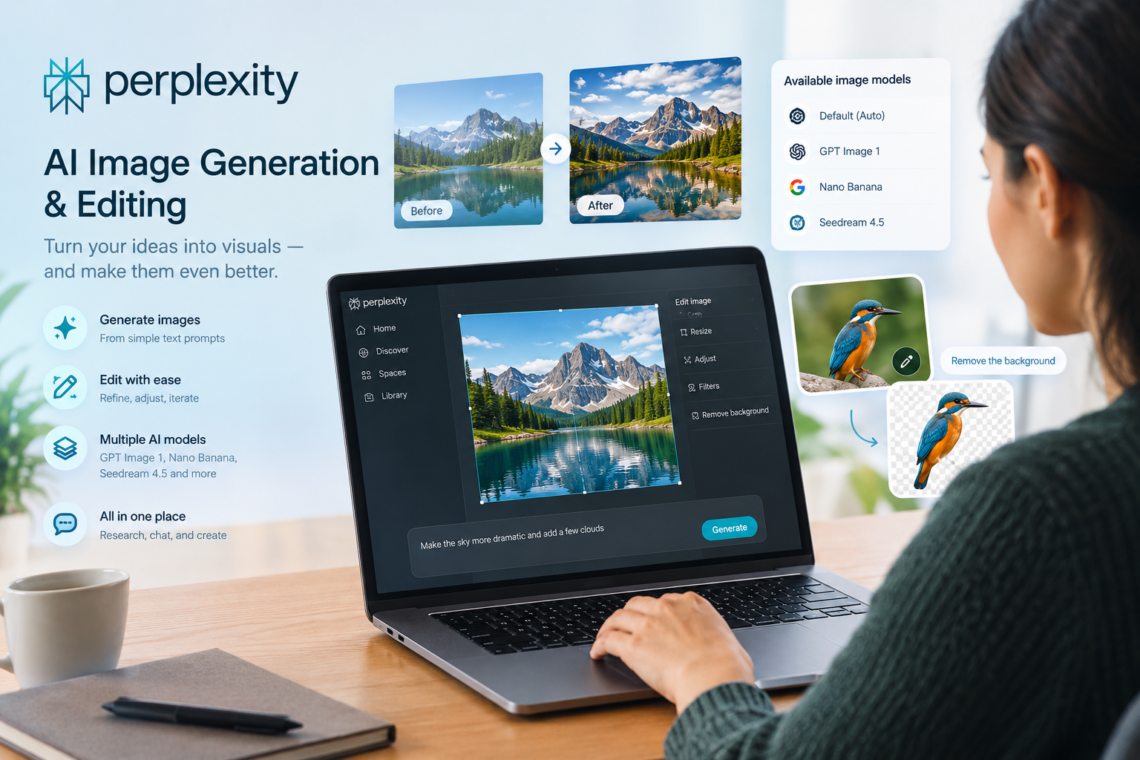
Perplexity’s July 2026 documentation lists GPT Image 1, Nano Banana, and Seedream 4.5 among its available image-generation models. Its default option can automatically select a model for the request, while supported users can choose an image-generation model through settings.
| Image model | Provider | Role in Perplexity |
|---|---|---|
| GPT Image 1 | OpenAI | Image generation |
| Nano Banana | Visual creation | |
| Seedream 4.5 | ByteDance | Image and design generation |
| Default | Perplexity selection | Automatically selects an available model |
Model availability can differ according to subscription, rollout, and other account conditions. Perplexity also changes its model lineup over time, so this table should be treated as a snapshot rather than a permanent list.
For users, this means that the quality of a result is influenced not only by the prompt but also by which generation model is being used.
Can You Choose the Image Model?
Yes, where the account and current Perplexity interface support model selection.
Perplexity’s documentation says users can go to their settings and select an Image generation model. The available choices can include the default automatic option, GPT Image 1, Nano Banana, and Seedream 4.5.
This can matter when a particular model produces better results for a certain type of request.
For example, someone creating a detailed technology illustration may want to compare results from different models rather than assuming that the default option will always produce the best possible image.
However, model names and availability can change. Perplexity explicitly notes that its model offerings are subject to change.
Perplexity AI Image Generation Capabilities for Editing
Image generation is not limited to creating something from an empty prompt.
Perplexity describes its current image-generation feature as supporting both generation and editing. Users can also regenerate an image when the first version does not meet their expectations.
This creates a useful workflow:
- Generate an initial image.
- Identify what is wrong.
- Give a more specific instruction.
- Generate another version.
- Compare the results.
- Continue refining if necessary.
For example, suppose you generate a blog header about artificial intelligence. The image might have the correct subject but feel too colorful.
A follow-up instruction could request a cleaner editorial appearance, fewer visual elements, a lighter background, and more empty space around the main subject.
The quality of this process depends heavily on how clearly the user describes the desired changes.
How to Write Better Perplexity Image Prompts
The biggest mistake beginners make is writing prompts that are too vague.
Compare these two requests:
Weak prompt:
Create an AI image.
Better prompt:
Create a professional editorial illustration for an AI technology blog showing a researcher analyzing a large language model on a computer screen. Use a clean white background, subtle blue accents, modern flat-design elements, realistic lighting, and enough empty space at the top for a headline.
The second prompt gives the image model much more information to work with.
A useful prompt can describe five areas:
Subject
Explain what should appear in the image.
Composition
Describe how the elements should be arranged.
Style
Specify whether you want something photorealistic, illustrative, minimalist, cinematic, editorial, cartoon-like, or another style.
Environment
Explain where the subject is located and what surrounds it.
Intended use
Tell Perplexity whether the image is intended for a blog header, presentation, advertisement, educational graphic, social post, or another purpose.
Perplexity itself recommends describing the subject, style, colors, mood, setting, and intended context, then refining the result when necessary.
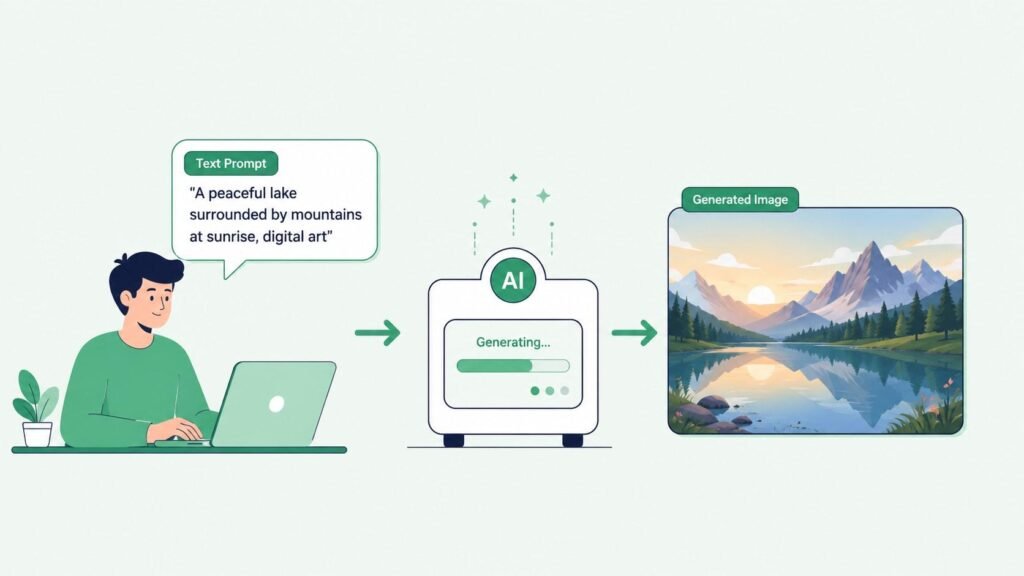
Real-World Examples of Perplexity Image Generation
Creating a technology blog image
Suppose an AI website publishes an article about AI automation.
Instead of searching for a generic stock photograph, the publisher could ask Perplexity to create an illustration showing automated software workflows connecting different business systems.
The advantage is control over the visual concept. The image can be designed around the article rather than selected from a collection of unrelated stock photographs.
Creating an educational concept
A teacher or technical writer could request an illustration explaining how a neural network processes information.
The resulting visual could then serve as a supporting graphic in an educational article or presentation.
However, diagrams containing precise technical information should still be checked carefully. Generative image systems can produce visually convincing graphics while getting labels, relationships, or technical details wrong.
Creating a presentation visual
A business professional preparing a presentation about artificial intelligence could generate a wide conceptual image showing people working with AI systems in a professional environment.
The prompt could specify the desired composition and leave enough negative space for presentation text.
Creating a poster-style image
Perplexity also offers a specific Perplexify Me experience that creates Perplexity-themed posters from uploaded or selected subjects. Perplexity says signed-in users can generate these posters, with different daily availability depending on the account type.
This is a more specialized use case than general image generation, but it demonstrates how Perplexity is extending image creation into interactive visual experiences.

Also Read: ETSIOSApp Version from eTrueSports
Perplexity Image Generation vs. Traditional AI Search
Perplexity’s image capabilities become more interesting when considered alongside its core search functionality.
A conventional image generator primarily starts with a visual prompt:
Create an image of a futuristic electric vehicle.
Perplexity can approach the task from a broader research-oriented workflow. A user might first research a technology, understand the subject, and then request a visual representation.
That combination can be useful for content creators who need both information and supporting visuals.
It does not mean Perplexity is automatically better than dedicated image-generation platforms for every creative task. Rather, its main advantage is convenience: research, conversation, and visual creation can happen within the same environment.
What Are the Advantages of Perplexity AI Image Generation?
1. Simple prompt-based workflow
Users do not need to learn a complicated interface before creating an image. The process begins with a natural-language request.
2. Multiple image models
Perplexity supports multiple image-generation models rather than permanently locking users to one model. This gives supported users more flexibility when choosing how images are generated.
3. Conversational refinement
Users can continue giving instructions instead of starting from scratch every time.
4. Useful for research and content workflows
Someone already using Perplexity for research can create supporting visual material without necessarily moving to another application.
5. Different creative styles
Perplexity’s own prompting guidance indicates that users can request styles such as photorealistic, watercolor, minimalist, cartoon, and vintage.
Limitations and Things to Watch Out For
Perplexity’s image generation is useful, but it should not be treated as a perfect image-production system.
Image quality can vary
Perplexity notes that image quality may vary during periods of heavy usage.
More importantly, generative models can make mistakes even when the resulting image looks convincing. Small details, objects, layouts, or text may not always match the prompt precisely.
Text inside images can be unreliable
If an image needs exact wording, labels, numbers, or technical terminology, the generated result should be inspected carefully.
For professional infographics, it can be safer to generate the visual background or conceptual artwork and add precise text separately using a design application.
Usage limits depend on the plan
Image generation is subject to plan-specific access and limits. Perplexity currently describes free access as limited, while paid plans receive different levels of image-generation access. Exact allowances can change, so users should check the current plan documentation before relying on a particular quota.
Commercial rights require attention
This is especially important for businesses and website owners.
According to Perplexity’s current help documentation, images generated by users on Free and individual Pro and Max plans are intended for personal, non-commercial use. Enterprise Pro and Enterprise Max users can use generated images for commercial purposes under the stated terms.
Anyone planning to use generated images for advertising, client work, products, or commercial publishing should check the current Perplexity Terms of Service rather than relying on an old article or forum post.
Privacy still matters
Users should think carefully before including confidential information in prompts or source material. Perplexity provides controls related to AI data retention, and its account documentation explains that users can control whether their search data is used to improve Perplexity’s AI models.
Organizations should review the current privacy and enterprise documentation before incorporating AI-generated images into workflows involving sensitive information.
Is Perplexity a Good Choice for AI Image Generation?
That depends on what you need.
Perplexity can be a strong choice when the goal is to combine research, prompting, image generation, and iterative refinement in one environment.
It is particularly convenient for:
- Technology bloggers
- Researchers
- Students
- Educators
- Presentation creators
- Content teams
- People who need quick concept images
A dedicated image-generation or design platform may still be preferable when the project requires highly specialized art direction, advanced editing controls, extensive asset management, or a professional production workflow.
The best approach is therefore not to ask whether Perplexity is universally the “best” image generator. A better question is whether its combination of research and image creation fits the particular job.
How to Get Better Results From Perplexity Image Generation
A practical workflow is:
- Define the purpose. Decide whether the image is for a blog, presentation, social media, education, or another use.
- Describe the subject clearly. Say exactly what should appear.
- Specify the visual style. Include terms such as editorial, photorealistic, minimalist, or illustrated when appropriate.
- Describe composition. Mention positioning, perspective, background, and empty space.
- Specify important colors. Avoid leaving essential branding decisions completely ambiguous.
- Generate the first version.
- Inspect every important detail.
- Refine the prompt. Ask for specific changes instead of simply saying “make it better.”
- Check the final image manually. Pay particular attention to text, logos, technical diagrams, hands, objects, and other details where generative errors can be noticeable.
This iterative process generally makes more sense than expecting one vague prompt to produce a publication-ready result immediately.
Frequently Asked Questions
Can Perplexity generate images?
Yes. Perplexity currently allows users to request image generation directly through prompts, with access and limits depending on the user’s account and plan.
What are Perplexity AI image generation capabilities?
The current capabilities include generating custom images from text prompts, regenerating results, and editing images through conversational instructions. Perplexity also supports multiple underlying image-generation models.
Which image models does Perplexity use?
Perplexity’s July 2026 documentation lists GPT Image 1, Nano Banana, and Seedream 4.5 among its available image-generation models. Model availability can change over time and may depend on the user’s plan.
Can you edit an image generated by Perplexity?
Yes. Perplexity supports image editing and allows users to regenerate an image or continue with a follow-up prompt to refine the result.
Is Perplexity image generation free?
Access depends on the current Perplexity plan. Perplexity’s current documentation describes limited image generation for Free users, with different and generally broader access on paid plans. Limits and plan details can change.
Can Perplexity-generated images be used commercially?
Not necessarily. Perplexity currently states that images generated by Free and individual Pro and Max users are for personal, non-commercial use, while Enterprise Pro and Enterprise Max users can use generated images commercially under the applicable terms. Always verify the latest terms before commercial use.
Does Perplexity always choose the same image model?
No. Its default image-generation option can automatically select an available model for the request. Supported users can also choose an image-generation model through settings.
Are Perplexity-generated images always accurate?
No. Like other generative image systems, Perplexity can produce visually convincing results that contain incorrect details. Images used for technical, educational, scientific, or professional purposes should be reviewed rather than assumed to be accurate.
Conclusion
The most useful way to understand Perplexity AI image generation capabilities is to see them as an extension of its research and conversational workflow. Users can describe an idea, generate a visual, inspect it, and refine it without treating image creation as an entirely separate task.
Its support for multiple image models gives users additional flexibility, while conversational prompting makes experimentation relatively accessible. At the same time, generated images still require human review, particularly when they contain technical information, precise text, branding, or other details where mistakes matter.
For bloggers, educators, researchers, and content creators, Perplexity can therefore be a practical option for producing custom visuals quickly. The strongest results come from treating the generated image as a draft that can be evaluated and refined—not as an automatically perfect final asset.