
Organizations create and collect an enormous amount of knowledge. It exists in documents, project management systems, emails, chat conversations, databases, customer records, internal guides, and the experience of individual employees. The problem is rarely a complete lack of information. The real problem is finding, understanding, maintaining, and sharing the right information when it is needed.
Enterprise knowledge management tools are designed to solve this problem. They help organizations organize knowledge, make it searchable, control who can access it, and reduce the risk of important information disappearing when employees change roles or leave the company.
Modern knowledge management has also expanded beyond a simple internal wiki. Many enterprise systems now connect information from multiple sources, use search technologies to retrieve relevant content, and may include AI-assisted features for summarization, question answering, and knowledge discovery.
This article explains what enterprise knowledge management tools are, how they work, what features matter, where they are useful, and what limitations organizations should consider before adopting them.
What Are Enterprise Knowledge Management Tools?
Enterprise knowledge management tools are software systems that help an organization capture, organize, store, find, share, and maintain internal knowledge.
That knowledge can include:
- Company policies and procedures
- Technical documentation
- Product information
- Employee onboarding materials
- Customer support knowledge
- Project documentation
- Research and reports
- Sales playbooks
- Security guidelines
- Training materials
- Internal expertise and best practices
The goal is not simply to create a large collection of documents. A useful knowledge management system helps people find information that is relevant, trustworthy, and current.
For example, imagine a customer support employee who needs to understand how a particular product issue should be handled. Without a knowledge management system, they might search through old emails, ask several colleagues, or look through multiple folders.
With a well-designed system, they should be able to search for the issue and find the approved procedure, relevant technical documentation, and the latest updates.
That difference is the core purpose of enterprise knowledge management.
The Difference Between Document Storage and Knowledge Management
A common misconception is that a shared drive automatically functions as a knowledge management system.
Document storage and knowledge management are related, but they are not the same thing.
A shared storage system may contain thousands of files. If employees do not know which file is current, who owns it, or whether the information is still accurate, the organization has stored information without effectively managing knowledge.
A knowledge management approach adds structure.
| Document Storage | Knowledge Management |
|---|---|
| Focuses on storing files | Focuses on making knowledge useful |
| Files may exist in separate folders | Information can be organized around topics, processes, or questions |
| Finding information may depend on folder knowledge | Search and navigation help users discover information |
| Old and current versions may coexist | Governance can define ownership and review processes |
| Access may be broad or inconsistent | Permissions can be managed based on roles and needs |
| Information may remain disconnected | Systems can connect related knowledge |
The technology matters, but processes and governance matter just as much.
A poorly maintained knowledge platform can eventually become as difficult to use as an unorganized shared drive.
How Enterprise Knowledge Management Tools Work
Different platforms use different architectures, but most enterprise knowledge systems involve several core stages.
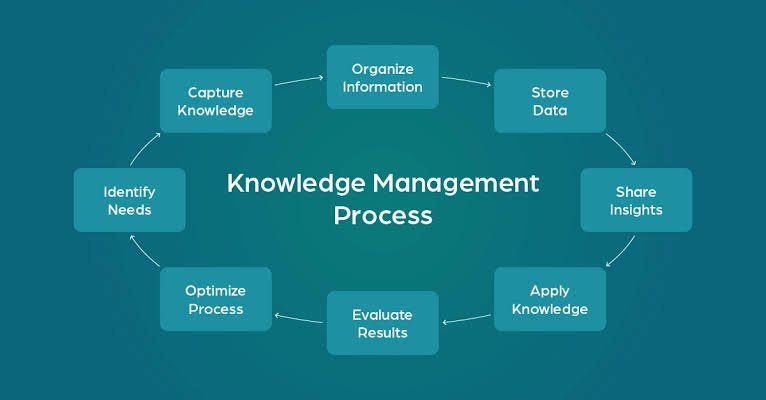
1. Capturing Knowledge
Knowledge must first enter the system.
This can happen when employees:
- Create documentation
- Upload files
- Record procedures
- Publish internal articles
- Document project decisions
- Add answers to recurring questions
- Connect existing data sources
Some knowledge management tools are primarily places where people write and maintain information. Others focus on connecting existing systems and making information easier to search.
For example, an organization may already have technical documentation in one platform, customer information in another, and internal discussions somewhere else. Instead of manually copying everything into a new location, an enterprise search or knowledge discovery system may connect to those sources.
2. Organizing Information
Raw information becomes more useful when it has structure.
Organizations may organize knowledge using:
- Categories
- Tags
- Departments
- Products
- Projects
- Topics
- Content types
- Metadata
For example, a software company might classify documentation by product, version, technical area, and audience.
This makes it easier to answer questions such as:
- Which documentation applies to this product version?
- Who owns this information?
- When was it last reviewed?
- Is this content intended for employees, customers, or both?
3. Indexing and Search
Search is one of the most important functions of enterprise knowledge management tools.
A search system may index titles, document contents, metadata, and other available information so users can retrieve relevant results.
Basic keyword search looks for matching words. More advanced search systems may also attempt to understand context, synonyms, relationships, or the meaning of a query.
However, more advanced search does not automatically mean better results.
If the underlying information is outdated, incomplete, or poorly organized, even sophisticated search technology can return unreliable answers.
4. Access Control
Enterprise knowledge often contains sensitive information.
A company may need different permissions for:
- Employees
- Managers
- Human resources teams
- Finance teams
- Developers
- Contractors
- External partners
A good system should respect existing access rules rather than exposing restricted information simply because it appears in a search index.
This becomes particularly important when AI-powered search or question-answering features are introduced. Organizations should verify how permissions are enforced before connecting sensitive internal data to an AI system.
5. Maintaining Knowledge
Knowledge changes.
A process that was correct six months ago may no longer be correct. A product feature may change. A policy may be replaced.
For this reason, knowledge management requires maintenance.
Useful practices include:
- Assigning content owners
- Setting review schedules
- Identifying outdated content
- Archiving obsolete material
- Maintaining version history
- Allowing users to report inaccurate information
A knowledge base is not a one-time project. It is an ongoing organizational process.
Key Features to Look for in Enterprise Knowledge Management Tools
The best feature set depends on the organization, but several capabilities are especially important.
Powerful Search
Users should be able to find information without knowing the exact document title or folder location.
Useful search capabilities may include:
- Full-text search
- Filters
- Metadata search
- Search suggestions
- Synonym handling
- Result ranking
- Search across connected systems
Search quality should be tested using real employee questions rather than only simple keyword searches.
Knowledge Base and Documentation Tools
Organizations need a practical way to create and update content.
Useful capabilities can include:
- Rich text editing
- Templates
- Version history
- Collaborative editing
- Approval workflows
- Content ownership
- Review reminders
The easier it is to maintain information correctly, the more likely employees are to keep the knowledge base useful.
Integrations
Enterprise knowledge rarely exists in one application.
Depending on the organization, useful integrations may connect the knowledge management system with:
- Communication platforms
- Project management software
- Customer support systems
- Cloud storage
- Source code repositories
- Customer relationship management systems
Before choosing a platform, organizations should identify where important knowledge already lives.
Permissions and Security
The system should support the organization’s access requirements.
Important questions include:
- Can permissions be applied at the document or workspace level?
- Does search respect source-system permissions?
- Can administrators audit access?
- How is sensitive information protected?
- What happens when an employee changes roles or leaves?
The exact security requirements depend on the organization and industry, so current vendor capabilities should always be verified directly with official documentation.
Analytics and Reporting
Analytics can help organizations understand whether the knowledge system is actually useful.
Possible measurements include:
- Frequently searched topics
- Searches that produce poor results
- Frequently accessed content
- Unanswered questions
- Content that may need updating
The goal is not simply to collect usage numbers. Analytics should help identify gaps in organizational knowledge.

AI and Enterprise Knowledge Management
AI has changed how many organizations think about internal knowledge.
Instead of searching through a list of documents, a user may ask a question in natural language, such as:
What is the current approval process for enterprise customer discounts?
An AI-assisted system may search connected knowledge sources and produce a summarized response.
This can be useful, but it introduces important risks.
Retrieval Is Still Essential
A language model can generate a convincing response even when the information is incorrect.
For enterprise use, AI systems are often more useful when they retrieve relevant organizational information before generating an answer.
A simplified process looks like this:
- An employee asks a question.
- The system searches approved knowledge sources.
- Relevant information is retrieved.
- The AI uses that information to formulate a response.
- The user may be shown the original sources for verification.
This approach can improve usefulness, but it does not guarantee accuracy.
If the retrieved documents are outdated or incomplete, the answer may also be outdated or incomplete.
Source Transparency Matters
When AI provides an answer about company knowledge, users should ideally be able to inspect where the information came from.
This is especially important for areas such as:
- Legal guidance
- Security procedures
- Financial processes
- Human resources policies
- Technical operations
An answer without a clear source may be harder to trust and verify.
AI Does Not Replace Knowledge Governance
One of the biggest mistakes organizations can make is assuming that AI will automatically organize messy information.
AI may help discover, summarize, classify, or retrieve information. It does not eliminate the need for:
- Content ownership
- Access controls
- Review processes
- Accurate documentation
- Clear data governance
Better AI results usually depend on better underlying knowledge.

Real-World Examples of Enterprise Knowledge Management
Example 1: A Technical Support Team
A software company receives recurring customer questions about configuration problems.
Instead of relying on experienced support employees to remember every solution, the company documents:
- Symptoms
- Possible causes
- Troubleshooting steps
- Product version information
- Escalation procedures
When a new support employee encounters a problem, they can search the knowledge system and follow the approved process.
This reduces dependence on individual memory and helps create more consistent support experiences.
Example 2: Employee Onboarding
A growing company hires new employees across multiple departments.
Previously, onboarding information was scattered across emails, spreadsheets, and informal messages.
The company creates a structured knowledge hub containing:
- Company policies
- Department guides
- Required tools
- Training materials
- Frequently asked questions
- Role-specific procedures
New employees have a clearer starting point, while managers spend less time repeatedly answering basic questions.
The system still requires maintenance. If an onboarding guide refers to an old process, the company needs someone responsible for updating it.
Example 3: Engineering Knowledge
An engineering team makes important architectural decisions during projects.
If those decisions remain only in chat conversations or the memory of individual developers, future team members may not understand why a particular system was designed in a certain way.
The team records:
- The decision
- Alternatives that were considered
- Reasons for the final choice
- Technical constraints
- Known limitations
Months later, another developer can understand the context instead of repeating the original investigation.
Example 4: Sales and Product Knowledge
A sales organization needs current information about products, pricing rules, customer use cases, and competitive positioning.
A centralized knowledge system can provide approved materials and identify which information is current.
This is particularly useful when products change frequently. Without a maintenance process, however, sales representatives may accidentally use outdated information.
Also Read: 10 Best Character AI Alternatives
Benefits of Enterprise Knowledge Management Tools
When implemented well, these tools can provide several practical benefits.
Faster Access to Information
Employees can spend less time asking who knows something or searching across disconnected systems.
Reduced Knowledge Loss
When experienced employees leave or change roles, documented processes and decisions remain available to the organization.
More Consistent Work
Teams can follow documented procedures rather than creating a different approach every time a recurring problem appears.
Better Collaboration
Knowledge becomes easier to share across departments, locations, and teams.
Easier Onboarding
New employees can access structured information instead of relying entirely on informal explanations from colleagues.
Identification of Knowledge Gaps
Search behavior and unanswered questions can reveal areas where documentation is missing or difficult to find.

Limitations and Challenges
Enterprise knowledge management tools are not automatically successful simply because they are installed.
Outdated Information
Old documentation can be worse than missing documentation because employees may trust information that is no longer correct.
Information Overload
Adding more content does not necessarily improve knowledge access.
If thousands of documents are poorly organized, users may still struggle to find the right answer.
Low Adoption
Employees may continue using familiar habits such as asking colleagues in chat if the knowledge system is difficult to use.
A successful rollout requires attention to user experience and workflow.
Permission Complexity
Large organizations may have complicated access rules. Connecting multiple systems without careful permission management can create security risks.
AI Accuracy Problems
AI-generated answers can contain errors, omit important context, or incorrectly combine information from different sources.
Critical decisions should not rely on an AI-generated response without appropriate verification.
Cost and Implementation Effort
Enterprise systems may involve licensing costs, migration work, integrations, training, administration, and ongoing maintenance.
The true cost is not limited to the software subscription.
How to Choose Enterprise Knowledge Management Tools
Organizations should start with their knowledge problems rather than immediately comparing feature lists.
A practical evaluation process looks like this.
1. Identify the Main Problem
Ask:
- What information is difficult to find?
- Where does important knowledge currently live?
- Which teams experience the biggest knowledge gaps?
- Is the problem search, documentation, collaboration, or governance?
Different problems may require different tools.
2. Map Existing Knowledge Sources
List the major systems containing important information.
This might include document repositories, internal wikis, support platforms, communication tools, and technical documentation.
3. Define Security Requirements
Identify what information is sensitive and who should be able to access it.
Do not treat security as something to configure after the system has already been deployed.
4. Test Real Employee Questions
Instead of evaluating a system using only vendor demonstrations, test realistic questions.
For example:
- How do I request access to a specific system?
- What is the latest process for handling a customer escalation?
- Why was this technical architecture chosen?
- Which policy applies to contractors?
A system should be evaluated based on whether employees can actually find trustworthy answers.
5. Plan for Ownership
Every important knowledge area should have a clear owner or process for maintenance.
Without ownership, the knowledge base can gradually become outdated.
Common Mistakes to Avoid
Treating Knowledge Management as a Software Purchase
Technology supports knowledge management. It does not create a knowledge-sharing culture by itself.
Migrating Everything Without Organizing It
Moving thousands of old files into a new platform can simply create a newer version of the old problem.
Ignoring Content Ownership
Important documents should have responsible owners who understand when updates are necessary.
Measuring Success Only by the Number of Documents
A large knowledge base is not necessarily a useful knowledge base.
The important question is whether users can find accurate information when they need it.
Deploying AI Without Testing Access and Accuracy
AI features should be tested for permission handling, source quality, accuracy, and appropriate behavior with sensitive information.
Frequently Asked Questions
What are enterprise knowledge management tools?
Enterprise knowledge management tools are systems that help organizations capture, organize, search, share, secure, and maintain internal knowledge such as documentation, policies, procedures, technical information, and best practices.
What is the difference between a knowledge base and a knowledge management system?
A knowledge base is usually a collection of organized information. A knowledge management system is broader and may include search, integrations, permissions, governance, analytics, workflows, and processes for maintaining organizational knowledge.
Can enterprise knowledge management tools use AI?
Yes. Some systems use AI for functions such as natural-language search, summarization, question answering, and knowledge discovery. AI-generated answers should still be checked against reliable source information when accuracy is important.
Are enterprise knowledge management tools only useful for large companies?
No. Smaller organizations also face problems with scattered documentation and knowledge loss. However, the complexity of the tool should match the organization’s actual needs.
What is the biggest challenge in knowledge management?
One of the most persistent challenges is keeping information accurate and current. Technology can make information easier to store and find, but organizations still need ownership and review processes.
How do you choose the right enterprise knowledge management tool?
Start by identifying the specific knowledge problem, existing information sources, security requirements, integration needs, and employee workflows. Then test potential systems using realistic questions and tasks.
Can AI replace a knowledge management system?
No. AI can help retrieve, summarize, and explain knowledge, but it still depends on the quality, accessibility, and governance of the underlying information.
Why are enterprise knowledge management tools important?
Enterprise knowledge management tools can help reduce information silos, preserve organizational knowledge, improve access to documentation, support collaboration, and make recurring work more consistent when they are properly implemented and maintained.
Conclusion
Enterprise knowledge management tools are most valuable when they help employees find accurate, relevant information without wasting time searching through disconnected systems or relying entirely on individual memory.
The software itself is only one part of the solution. Strong knowledge management also requires clear ownership, useful organization, reliable search, appropriate access controls, and a process for keeping information current.
AI can make enterprise knowledge easier to search and interact with, but it does not solve poor documentation or weak governance. If the underlying knowledge is inaccurate or outdated, AI can make those problems easier to spread.
The best approach is to begin with the organization’s real knowledge challenges. Choose enterprise knowledge management tools that fit those needs, test them with real employee questions, protect sensitive information, and treat knowledge as something that requires continuous maintenance rather than a one-time software project.