AI automation is becoming a practical skill rather than a purely technical specialty. Businesses use it to handle repetitive tasks, organize information, respond to customers, generate content, analyze data, and connect software workflows. Individuals can also use AI automation to save time and build useful systems without becoming machine learning engineers.
If you are searching for how to learn AI automation, the biggest challenge is often knowing where to start. The field includes artificial intelligence, automation platforms, APIs, prompts, databases, and business workflows. Trying to learn everything at once can quickly become overwhelming.
The good news is that you do not need to master every AI technology before building useful automations. This guide explains what AI automation actually is, which skills matter most, how the pieces work together, and a practical path you can follow from beginner projects to more advanced systems.
What Is AI Automation?
AI automation combines traditional automation with artificial intelligence.
Traditional automation follows predefined rules. For example:
When a customer submits a form, add their information to a spreadsheet and send a confirmation email.
Every step is explicitly defined.
AI automation adds a system that can interpret information or generate an output. For example:
When a customer submits a support request, use an AI model to identify the topic and urgency, summarize the request, and send it to the appropriate team.
The workflow still has defined steps, but AI handles tasks that would be difficult to manage with simple if-this-then-that rules.
A Simple AI Automation Workflow
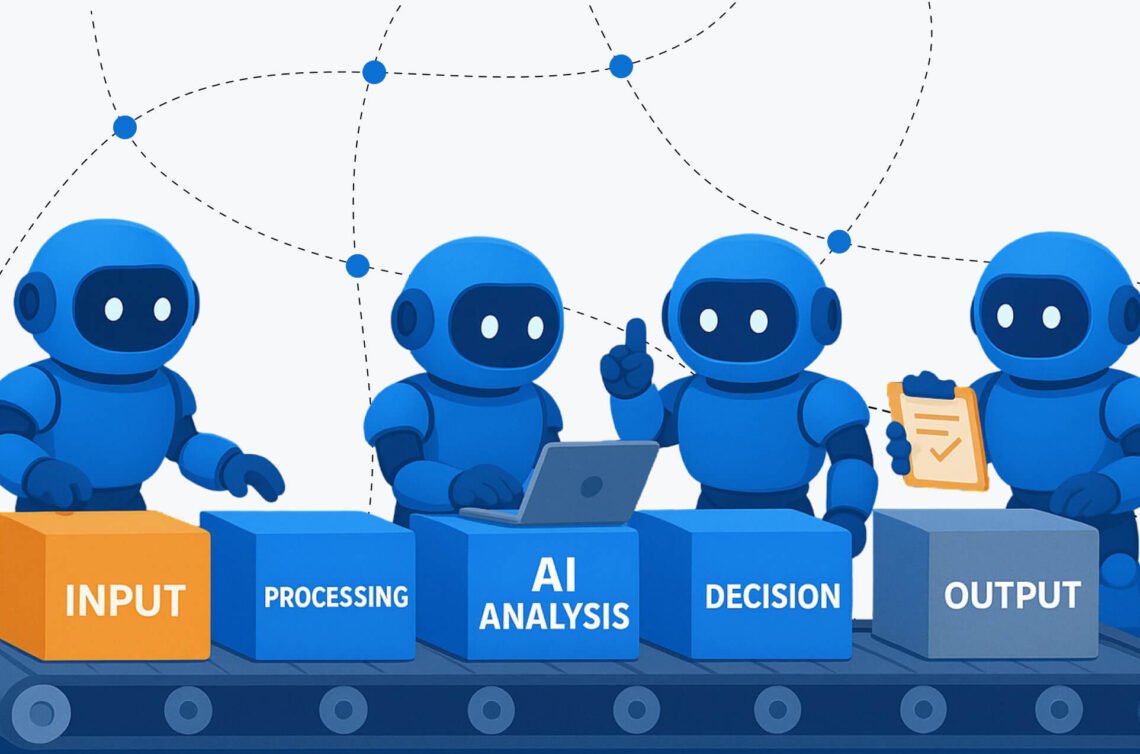
A typical workflow might look like this:
- A new event triggers the automation.
- Information is collected from an app, form, email, or database.
- The data is sent to an AI model.
- The AI analyzes, classifies, summarizes, extracts, or generates information.
- The result is checked or formatted.
- Another application receives the final output.
For example:
New email → AI summarizes the email → AI identifies the priority → Important messages are added to a task manager
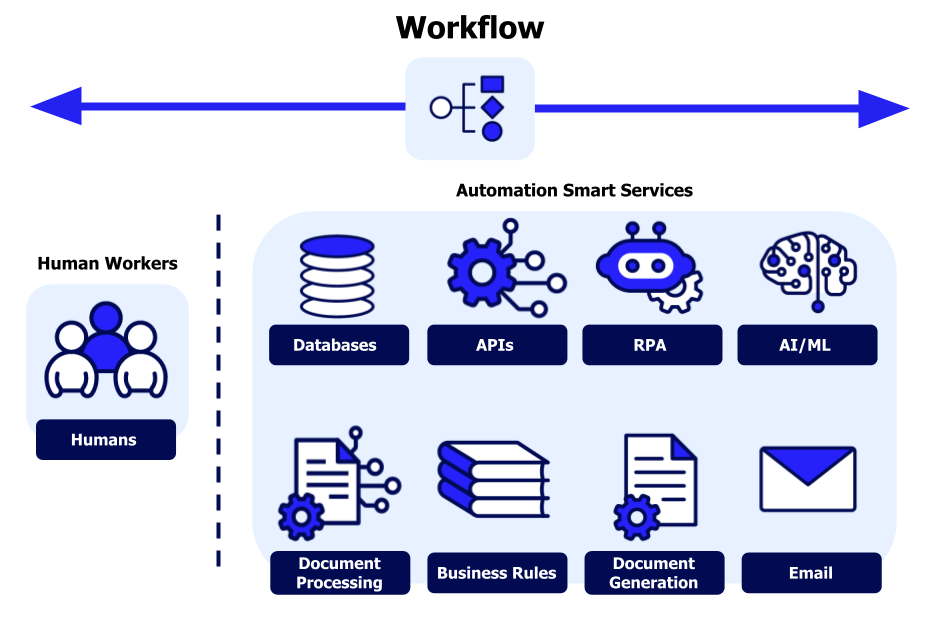
The automation platform coordinates the workflow. The AI provides reasoning or language-processing capabilities within that workflow.
Why Learning AI Automation Is Different From Learning AI Engineering
One common mistake is assuming that learning AI automation means learning to build AI models from scratch.
These are different skill paths.
| Area | Main Focus |
|---|---|
| AI automation | Using AI models inside workflows and business processes |
| Machine learning | Training and evaluating predictive models |
| AI engineering | Building applications and systems powered by AI models |
| Data science | Analyzing data and developing insights or models |
| Automation | Connecting applications and automating repeatable processes |
Someone learning AI automation may work with APIs and basic code, but they usually do not need to begin by studying advanced mathematics or training neural networks.
The most useful starting point is understanding how work flows through a system.
How to Learn AI Automation Step by Step
The most effective way to learn AI automation is to build skills in layers. Start with simple workflows and gradually add more technical concepts.
1. Learn How Automation Workflows Work
Before focusing heavily on AI, understand basic automation logic.
Most automation systems include several common concepts:
- Trigger: The event that starts the workflow.
- Action: Something the workflow does.
- Condition: A rule that determines what happens next.
- Data: Information passed between applications.
- Variable: A value stored and reused during a workflow.
- Webhook: A method for applications to send data to another system.
- API: A way for software applications to communicate.
Consider this simple workflow:
- A user completes a contact form.
- The form submission triggers an automation.
- The information is added to a customer database.
- A notification is sent to a team member.
There is no AI involved yet. That is useful because it teaches the structure that AI will later fit into.
2. Understand What AI Models Can Actually Do
You do not need to understand every technical detail of large language models before using them. However, you should understand the kinds of tasks they are suitable for.
AI models can often help with:
- Summarizing text
- Classifying information
- Extracting structured data
- Rewriting content
- Generating drafts
- Translating text
- Answering questions based on supplied information
- Identifying patterns in unstructured text
For example, imagine receiving 500 customer feedback messages.
A traditional workflow could store every message in a spreadsheet.
An AI-powered workflow could:
- Read each message.
- Identify the main topic.
- Determine whether the sentiment appears positive, negative, or neutral.
- Extract product names.
- Create a short summary.
- Save the structured results.
The AI does not replace the workflow. It performs one part of the workflow.
3. Learn Prompt Design for Automation
Prompts become especially important when AI is part of an automated system.
A casual prompt might be:
Summarize this customer message.
A more reliable automation prompt could be:
Analyze the customer message below. Return:
- A summary of no more than 50 words
- The primary issue
- Priority: low, medium, or high
Return the result in the requested structured format.
The second approach is more useful because automation systems need predictable outputs.
When learning prompts for AI automation, practice:
- Giving clear instructions
- Providing necessary context
- Defining the expected output
- Setting constraints
- Asking for structured responses
- Testing prompts with different examples
Do not assume a prompt that works once will work perfectly with every input. Automated workflows should be tested against short, long, unclear, and unusual examples.
4. Start With a No-Code Automation Platform
For beginners, no-code or low-code automation tools can make it easier to understand workflows without writing a large amount of software.
The exact platform you choose matters less than the concepts you learn.
Look for tools that allow you to work with:
- Triggers
- Actions
- Conditional logic
- Data mapping
- Webhooks
- API connections
- AI integrations
Start with small projects instead of trying to build a complete AI business system immediately.
A good first project might be:
New form submission → AI summarizes the response → Summary is saved in a database
This teaches several important concepts without introducing too much complexity.
5. Learn APIs and Webhooks
As you progress, APIs and webhooks become extremely useful.
You do not need to become a backend developer immediately, but understanding the basics will expand what you can automate.
What Is an API?
An API allows one software system to request information or functionality from another system.
For example, an automation workflow might send text to an AI service through an API and receive a generated response.
A basic request usually involves:
- An endpoint
- Authentication
- Input data
- A request method
- A response
The response is often returned in a structured format such as JSON.
What Is a Webhook?
A webhook sends information automatically when an event occurs.
For example:
A payment is completed → the payment system sends data to a webhook → your automation begins.
Understanding webhooks helps you connect systems that may not have a built-in integration.
6. Learn Basic JSON and Data Handling
You do not need advanced programming knowledge to work with AI automation, but basic data handling is extremely valuable.
JSON is commonly used for structured information.
For example:
{
  "customer_name": "Sarah",
  "priority": "high",
  "issue": "Unable to access account"
}
Learning to read and work with structures like this makes it easier to:
- Connect APIs
- Extract AI outputs
- Store information
- Pass data between workflow steps
- Debug automations
A major part of AI automation is not simply asking AI questions. It is making sure the right information reaches the right step in the workflow.
7. Add Basic Programming When You Need It
You can build many automations without code, but basic programming can help you go further.
Python and JavaScript are both useful options, depending on the tools and systems you want to work with.
You do not need to begin by learning advanced algorithms.
Focus first on practical skills such as:
- Variables
- Lists and objects
- Functions
- Conditions
- Loops
- HTTP requests
- JSON
- Error handling
For example, a small script might clean incoming data before sending it to an AI model.
The goal is not to become a software engineer before building automations. Learn enough programming to solve problems that no-code tools cannot easily handle.
A Practical Learning Roadmap
Here is a realistic progression for learning AI automation.
Stage 1: Learn Basic Automation
Focus on:
- Triggers and actions
- Conditional logic
- Data mapping
- Simple multi-step workflows
Build projects such as:
- Form submission to spreadsheet
- New email to task creation
- Automatic notifications
- Data synchronization between two tools
Stage 2: Add AI to Simple Workflows
Learn how to use AI for:
- Summarization
- Classification
- Extraction
- Content transformation
Projects could include:
- AI email summarizer
- Customer inquiry classifier
- Meeting note organizer
- Review analysis workflow
Stage 3: Learn APIs and Structured Data
Focus on:
- JSON
- API requests
- Authentication
- Webhooks
- Structured AI outputs
Build workflows that connect services without relying entirely on prebuilt integrations.
Stage 4: Learn Basic Code
Choose a programming language and learn enough to:
- Process data
- Call APIs
- Handle errors
- Create custom logic
Stage 5: Build Complete Systems
Combine your skills into larger projects involving:
- Multiple data sources
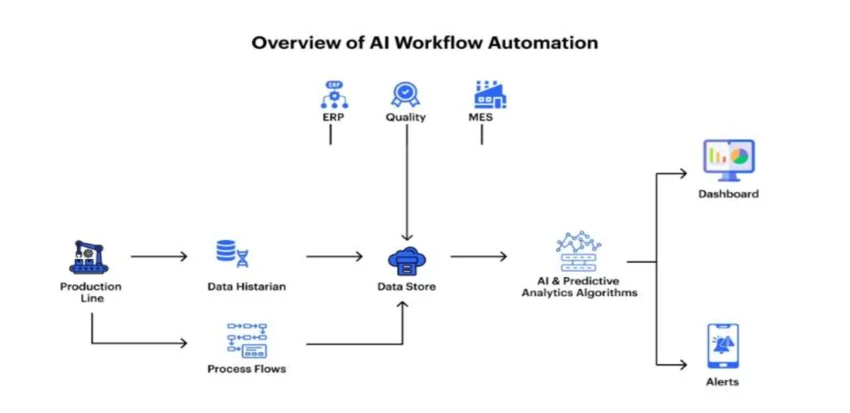
- AI processing
- Databases
- Human approval steps
- Notifications
- Error handling
- Monitoring
At this stage, you are no longer just experimenting with AI tools. You are learning how to design reliable automated systems.
Real-World AI Automation Examples
Understanding concrete examples makes the subject much easier to learn.

Example 1: Customer Support Ticket Routing
Imagine a company receives hundreds of support messages.
An AI automation could work like this:
- A customer submits a support request.
- The workflow receives the message.
- AI identifies the topic, such as billing, login, or technical support.
- AI estimates the urgency based on predefined criteria.
- The workflow sends the ticket to the appropriate queue.
- A human agent reviews and responds.
The value is not that AI completely replaces support workers. The system reduces repetitive sorting work and helps requests reach the correct person faster.
Example 2: Meeting Notes to Action Items
A workflow receives a meeting transcript.
The AI step is instructed to extract:
- Key decisions
- Action items
- Responsible people
- Deadlines, if clearly stated
The workflow then sends the action items to a project management system.
A good system should still allow humans to review important outputs because AI can misunderstand names, dates, or ambiguous statements.
Example 3: Content Research Organization
Suppose a writer collects dozens of research notes.
An automation could:
- Receive each note.
- Categorize it by topic.
- Generate a short summary.
- Extract important claims.
- Store the original source reference.
- Save everything in a searchable knowledge base.
The AI helps organize information, while the human remains responsible for verifying facts and deciding how to use the research.
Example 4: Lead Qualification
A business receives inquiries through its website.
The automation can examine the submitted information and classify leads based on predefined criteria.
For example:
- Enterprise inquiry
- Small business inquiry
- Partnership request
- General question
The workflow can then route each category to the appropriate team.
The criteria should be carefully designed. Poor classification rules or unclear prompts can send important leads to the wrong place.
What Skills Are Most Important for AI Automation?
You do not need to learn everything at once. These skills usually provide the strongest foundation.
| Skill | Why It Matters |
|---|---|
| Workflow design | Helps you understand what should happen at each step |
| Prompt design | Improves the consistency of AI outputs |
| Data handling | Allows information to move correctly between systems |
| JSON | Commonly used when working with APIs and structured outputs |
| APIs | Allows you to connect more services |
| Webhooks | Helps systems communicate when events occur |
| Basic programming | Useful for custom logic and advanced workflows |
| Debugging | Essential when an automation fails or produces incorrect results |
The most underrated skill is often workflow design.
Before building anything, ask:
- What starts the process?
- What information is available?
- Where should the information go?
- Which step actually needs AI?
- What happens if AI produces an incorrect result?
- Does a human need to approve certain actions?
These questions can prevent unnecessary complexity.
Also Read: Droven IO AI Automation Tools
Common Mistakes When Learning AI Automation
Trying to Learn Every Tool
New automation and AI platforms appear constantly.
Instead of switching between many tools, learn the underlying concepts:
- Triggers
- Actions
- APIs
- Webhooks
- Data structures
- Conditions
- AI inputs and outputs
Tools can change. Core concepts remain useful.
Adding AI Where Simple Rules Would Work Better
Not every workflow needs AI.
For example, if an order total is above a specific amount, a simple condition may be more reliable and less expensive than asking an AI model to decide.
Use AI when the task involves ambiguity, language, interpretation, extraction, or generation.
Use traditional automation when the logic is clear and deterministic.
Trusting AI Output Without Validation
AI can produce incorrect or inconsistent results.
For low-risk tasks, automated output may be sufficient.
For high-impact tasks involving areas such as financial decisions, legal matters, security, or important customer actions, stronger validation and appropriate human oversight may be necessary.
Building Large Projects Too Early
A complicated AI agent connected to ten different services may sound impressive, but it is difficult to debug if you do not understand the individual components.
Start with one trigger, one AI task, and one output.
Then add complexity gradually.
Ignoring Error Handling
A workflow can fail because:
- An API is temporarily unavailable
- Input data is missing
- AI output has an unexpected format
- Authentication expires
- A connected application changes its behavior
Reliable automation requires planning for failure, not just designing the ideal path.
Advantages of AI Automation
AI automation can provide several practical benefits.

Faster Repetitive Work
AI can process and transform large amounts of text or other information faster than manually performing the same repetitive task.
Better Handling of Unstructured Information
Traditional automation works best with predictable inputs.
AI can help process information such as:
- Emails
- Documents
- Customer messages
- Meeting transcripts
- Feedback
- Open-ended form responses
Scalable Workflows
Once a workflow is properly designed and tested, it can often handle a larger volume of similar tasks without requiring each step to be performed manually.
More Consistent Processes
A carefully designed workflow can apply the same process repeatedly. However, consistency depends on the reliability of the AI model, prompts, input data, and validation steps.
Limitations and Risks of AI Automation
AI automation is not automatically accurate, inexpensive, or reliable.
Incorrect Outputs
AI can misunderstand context or generate incorrect information. A workflow should not treat every AI response as verified truth.
Privacy and Data Security
Before sending information to an AI service or automation platform, consider:
- What data is being shared?
- Where is it processed?
- How long is it retained?
- Who can access it?
- Does the provider’s current policy meet your requirements?
Policies and features can change, so current documentation should be checked before using a service for sensitive or regulated data.
Cost
Automated systems may involve costs from:
- AI usage
- Automation platforms
- API requests
- Database services
- Hosting
- Monitoring tools
A workflow that works well at a small scale may become more expensive as usage increases.
Integration Failures
An automation depends on multiple services working together. A change or failure in one system can affect the entire workflow.
Poorly Defined Goals
AI cannot fix a poorly designed process.
Before automating, understand the manual process. If the workflow itself is confusing or inefficient, automation may simply make the problem happen faster.
How to Practice AI Automation Effectively
The fastest way to improve is to build small projects around real problems.
Try this progression:
- Automate a repetitive task without AI.
- Add AI to one specific step.
- Test the workflow with different inputs.
- Add structured outputs.
- Create error handling.
- Add a human review step where appropriate.
- Measure whether the automation actually saves time or improves the process.
Keep a simple record of each project.
For every automation, document:
- The problem
- The trigger
- The inputs
- The AI task
- The expected output
- The destination
- Possible failure points
This habit helps you think like a systems designer rather than simply experimenting with individual AI tools.
Frequently Asked Questions
How long does it take to learn AI automation?
You can learn the basics and build simple workflows relatively quickly, but becoming confident with APIs, data handling, debugging, and complex systems takes continued practice. Progress depends more on the projects you build than on the number of tutorials you watch.
Do I need coding skills to learn AI automation?
No. You can start with no-code or low-code automation tools. However, learning basic programming can give you more flexibility as your projects become more advanced.
What is the best way to start learning AI automation?
Start by learning basic automation concepts, then build a simple workflow and add AI to one task such as summarization or classification.
Is AI automation the same as AI agents?
No. AI automation usually follows a predefined workflow. AI agents may be designed to choose actions or use tools with greater flexibility. In practice, the distinction can vary depending on how a particular system is designed.
Which programming language is best for AI automation?
Python and JavaScript are both practical choices. The better option depends on the platforms, APIs, and development environment you plan to use.
Can I learn AI automation without learning machine learning?
Yes. Many AI automation projects use existing AI models through applications or APIs. You do not need to begin by training machine learning models.
What should I build as my first AI automation project?
A good first project is a simple workflow such as receiving a form submission, sending the text to an AI model for summarization or classification, and saving the result in another application.
Is learning AI automation worth it?
It can be a valuable skill if you are interested in improving workflows, connecting software systems, or building practical AI-powered processes. The strongest approach is to focus on transferable skills such as workflow design, data handling, APIs, and problem-solving rather than relying on one specific tool.
Conclusion
Learning how to learn AI automation is less about finding one perfect course or mastering every new AI tool. It is about developing a practical understanding of workflows and then learning where AI can improve them.
Start with traditional automation. Learn how data moves between systems. Add AI for tasks involving language, classification, extraction, or interpretation. Then gradually build your knowledge of prompts, APIs, JSON, webhooks, and basic programming.
Most importantly, build real projects.
A small automation that solves one genuine problem will teach you more than hours spent watching disconnected tutorials. As your projects become more complex, focus on reliability, validation, privacy, cost, and human oversight.
The best path to learning AI automation is simple: understand the process, automate the predictable parts, use AI where interpretation is useful, and improve your system one project at a time.