

Automation increase productivity by taking repetitive, predictable work out of people’s hands and allowing them to spend more time on tasks that require judgment, creativity, communication, and problem-solving.
The idea is broader than simply using software to complete tasks automatically. Effective automation changes how work moves through a process. Instead of repeatedly collecting information, entering the same data, sending routine messages, or checking whether something happened, a well-designed automated workflow can handle those steps with little or no manual intervention.
This guide explains how automation can increase productivity, what types of work are good candidates for automation, how automated workflows operate, and where automation can create problems. It also covers practical examples, implementation steps, limitations, and common questions so you can evaluate automation realistically rather than assuming that every automated process is automatically better.
What Does Automation Increase Productivity Mean?
The phrase automation increase productivity describes the improvement that can occur when technology performs repetitive or rule-based work with less human involvement.
For example, imagine a business receives an online contact form. Without automation, someone might need to:
- Open the form submission.
- Copy the person’s information.
- Add it to a spreadsheet or customer system.
- Send a confirmation email.
- Notify the appropriate employee.
- Create a follow-up task.
An automated workflow can connect these steps. Once the form is submitted, the system can transfer the information, send the confirmation, notify the right person, and create the task automatically.
The important point is that automation does not necessarily replace the entire job. It often removes individual repetitive steps from a larger process.
How Does Automation Increase Productivity?
Automation can improve productivity in several different ways.

1. It reduces repetitive manual work
Repetition is one of the clearest opportunities for automation.
Tasks such as copying information between systems, generating routine reports, sorting incoming requests, or sending standard notifications can consume considerable working time when performed manually.
When the task follows consistent rules, software can often perform it automatically.
This allows employees to concentrate on work that cannot be handled effectively by simple rules.
2. It reduces unnecessary task switching
Productivity is not only about how quickly someone completes an individual task. Constantly switching between applications and small administrative activities can also make work harder to manage.
Consider an employee who must repeatedly:
- Check an inbox
- Open a spreadsheet
- Update a customer record
- Send a message
- Create a reminder
- Return to the original task
An automated workflow can connect some of these actions, reducing the number of interruptions.
The employee can then focus on the decision that actually requires their attention.
3. It can make processes more consistent
People can make mistakes, forget steps, or perform routine procedures differently.
Automation can apply the same predefined rules each time.
For example, an organization could create a workflow that automatically checks whether a submitted document contains required information before sending it for review.
Consistency is particularly useful when a process contains many repetitive steps.
4. It can accelerate routine processes
Automation can execute certain actions immediately after a predefined event.
For example:
Customer submits a form → information is recorded → confirmation is sent → employee is notified
Instead of waiting for someone to notice the submission and manually start the process, the workflow can begin automatically.
The exact productivity improvement depends on the process, the technology, and how much manual work existed beforehand.
5. It allows work to continue without every step requiring human attention
Some automated workflows can operate outside normal working hours.
For example, a website could automatically acknowledge a support request when it arrives. A monitoring system could detect a predefined technical condition and notify the responsible team.
This does not mean automation eliminates the need for people. It means people do not necessarily need to be present for every routine event.
Which Tasks Should Be Automated?
Not every task is a good candidate for automation.
The strongest candidates usually have several characteristics:
- They happen frequently.
- They follow predictable rules.
- They involve repetitive actions.
- They require information to move between systems.
- They produce a predictable result.
- They are easy to measure.
- Errors can be identified and corrected.
A simple way to evaluate a task is to ask:
Does this task require human judgment, or does it mostly require following a known procedure?
If the answer is mostly procedure, automation may be worth investigating.
Good candidates for automation
Examples include:
- Sending routine notifications
- Creating recurring reports
- Moving data between connected systems
- Assigning incoming requests
- Creating calendar reminders
- Organizing files according to predefined rules
- Processing standard form submissions
- Sending confirmation messages
- Updating records after a known event
Poor candidates for full automation
Some activities depend heavily on context and judgment, such as:
- Complex negotiations
- Sensitive employee decisions
- Strategic planning
- Handling unusual customer situations
- Making decisions with incomplete information
- Creative work where the desired outcome is difficult to define
These activities may still benefit from automation, but usually as assistance rather than complete replacement.
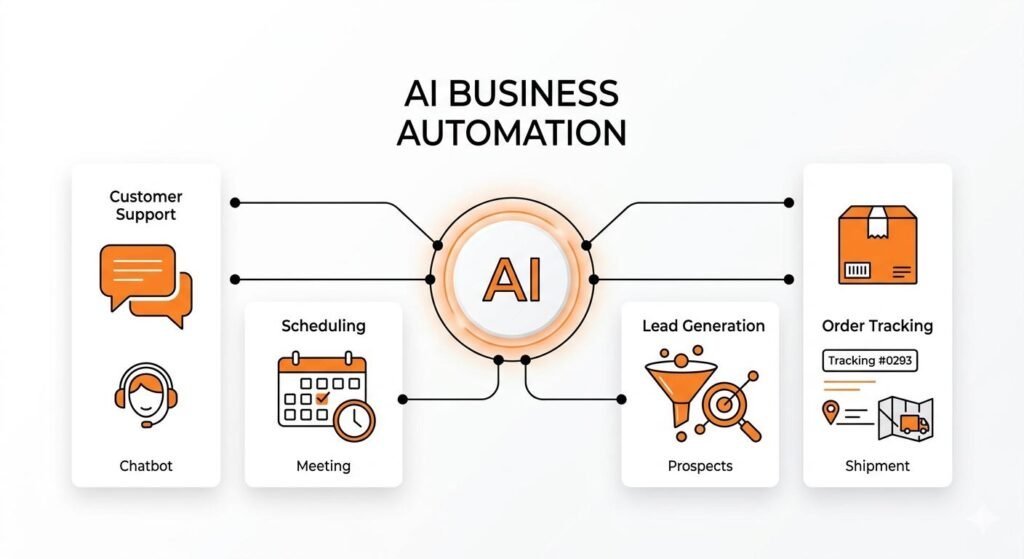
Automation vs. AI Automation
Traditional automation and AI automation overlap, but they are not identical.
Traditional automation generally works through explicit rules.
For example:
If an invoice is received → save it → notify accounting.
AI can be useful when the information is less structured.
For example:
If an email arrives → determine its topic → extract relevant information → classify its priority → send it to the appropriate workflow.
The distinction matters because AI introduces additional uncertainty.
A rule-based automation might always perform a defined action when a condition is met. An AI system may interpret text, images, or other information and produce an output that needs validation.
Therefore, adding AI does not automatically make a workflow more productive.
The right question is:
Where does intelligent interpretation provide value that ordinary automation cannot provide efficiently?
Real-World Examples of Automation Increasing Productivity
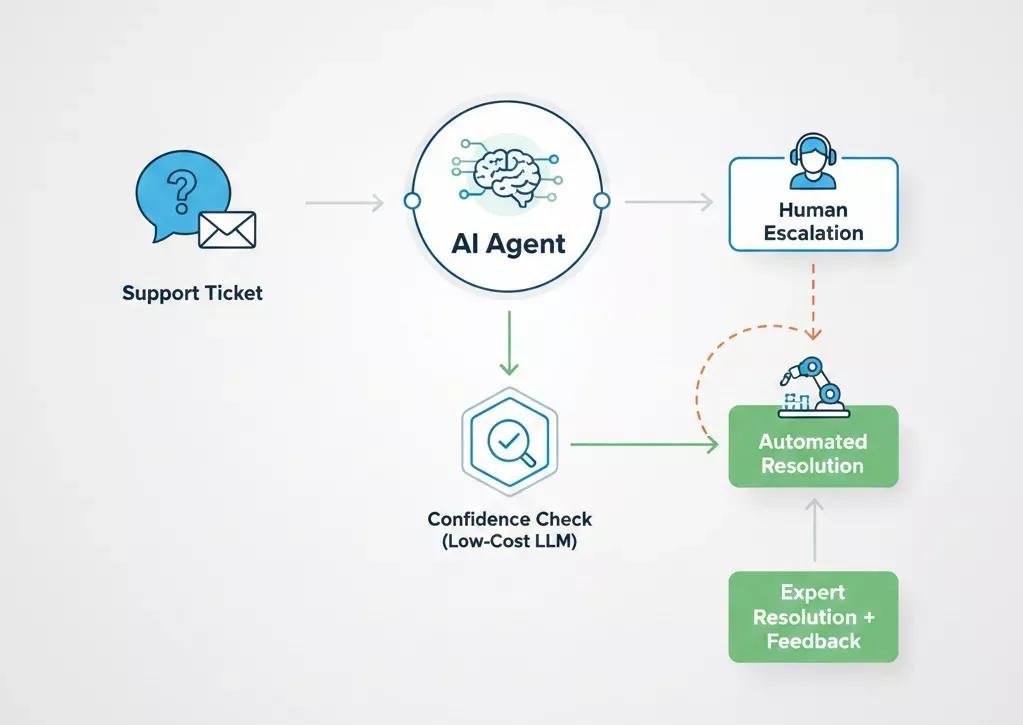
Automated customer support routing
Suppose a company receives hundreds of support requests through email or a web form.
A workflow could:
- Receive the request.
- Extract basic information.
- Categorize the request.
- Identify its priority according to predefined rules.
- Send it to the appropriate team.
- Create a tracking record.
- Notify the customer that the request was received.
The support employee does not need to perform all of those administrative steps manually.
However, complicated cases can still be escalated to a human.
Automated invoice processing
A finance team may receive invoices electronically.
An automation workflow can potentially:
- Capture incoming invoices
- Extract relevant fields
- Match information against existing records
- Route invoices for approval
- Notify the appropriate person
- Update a financial system after approval
Human review can remain in the process for exceptions or decisions requiring authorization.
The productivity benefit comes from reducing repetitive administration rather than removing financial oversight.

Automated employee onboarding
Employee onboarding can involve many routine actions.
After an employee is added to an organization’s system, an automated workflow could create predefined tasks for relevant departments, send informational messages, schedule required activities, and request necessary documents.
Instead of several people independently remembering each step, the workflow provides a consistent sequence.
Automated reporting
A manager may need a recurring report containing information from several systems.
Without automation, someone might manually collect the information, organize it, calculate figures, and distribute the report.
An automated reporting process can collect predefined information on a schedule, perform established calculations, and generate or distribute the report.
The human role can then focus more on interpreting what the information means.
Automated content workflows
Content teams can automate administrative parts of publishing.
For example:
Article approved → metadata checklist created → image request generated → editorial notification sent → publishing task assigned
Automation does not have to write the article. It can simply coordinate the repetitive steps around content production.
This distinction is important because productivity often improves by automating the workflow surrounding creative work, rather than trying to automate creativity itself.
Also Read: Drift Chatbot Pricing
How to Build a Productive Automation Workflow
Automation should begin with the process, not the software.
Step 1: Document the existing process
Write down what actually happens today.
Identify:
- The starting event
- Every major step
- Who performs each step
- Which systems are involved
- Where information is entered
- Where delays occur
- Where mistakes occur
This often reveals unnecessary steps before any automation is created.
Step 2: Identify the repetitive parts
Separate routine actions from decisions.
For example:
Routine: Send a confirmation email.
Decision: Determine whether a customer complaint requires escalation.
The first is usually easier to automate. The second may require human judgment or carefully designed AI assistance.
Step 3: Define the trigger
Every automated workflow needs something that starts it.
Examples include:
- A form submission
- A new email
- A new database record
- A scheduled time
- A payment event
- A status change
- A file being uploaded
A clearly defined trigger prevents the workflow from operating unpredictably.
Step 4: Define the rules and actions
Next, specify what should happen after the trigger.
For example:
New support request → classify → check priority → assign team → send confirmation → create task
The clearer these rules are, the easier the workflow is to test.
Step 5: Add human review where necessary
Do not automate decisions simply because automation software allows you to.
If an action could cause significant financial, legal, security, customer, or operational consequences, consider requiring human approval.
A useful design is:
Automation handles routine cases → unusual cases go to a person.
Step 6: Test before scaling
Start with a limited workflow.
Test:
- Normal cases
- Missing information
- Duplicate information
- Unexpected inputs
- Failed integrations
- Incorrect classifications
- Human overrides
A workflow that works perfectly with normal data may still fail when real-world exceptions appear.
Measuring Whether Automation Actually Improves Productivity
Automation should be measured by outcomes, not by how sophisticated the technology looks.
Useful measures can include:
- Time spent on the process before automation
- Time spent after automation
- Number of manual steps removed
- Processing time
- Error frequency
- Number of tasks completed
- Number of exceptions requiring human intervention
- Cost of running the workflow
- User satisfaction
For example, if a workflow saves employees time but creates frequent errors that require manual correction, it may not represent a genuine productivity improvement.
A better evaluation considers the entire process.
Productivity is not simply speed
A faster process is not necessarily a better process.
Suppose automation allows an organization to process requests twice as quickly but produces more incorrect results.
The organization may actually become less productive because employees now have to repair the mistakes.
Good automation balances:
Speed + accuracy + reliability + cost + human oversight
Benefits and Limitations of Automation
| Potential benefit | Possible limitation |
|---|---|
| Reduces repetitive work | Initial setup requires effort |
| Can speed up routine processes | Poor workflows can automate bad processes |
| Improves consistency | Rules may fail with unusual situations |
| Reduces manual data entry | Integrations can break |
| Can reduce interruptions | Employees still need oversight |
| Supports scalable processes | Software and maintenance can cost money |
| Enables automatic notifications | Excessive automation can create notification overload |
Automation can amplify a bad process
One of the most important misconceptions is:
If a process is inefficient, automating it will automatically make it efficient.
It will not.
If employees currently follow ten unnecessary steps, automating all ten may simply make the inefficient process happen faster.
Before automating, ask whether each step is actually necessary.
Sometimes the best productivity improvement is:
Remove → simplify → automate
rather than:
Automate everything
Common Automation Mistakes
Automating too much at once
Large automation projects can become difficult to troubleshoot.
Starting with one well-defined process makes it easier to identify problems and demonstrate value.
Ignoring exceptions
Real-world processes rarely behave perfectly.
People forget information, systems become unavailable, customers provide unexpected details, and data can arrive in different formats.
A reliable workflow needs an exception path.
Removing human oversight completely
Automation should not be treated as infallible.
Human review remains important when mistakes can have serious consequences.
Choosing software before understanding the problem
It is tempting to select an automation platform first and then search for something to automate.
A better approach is to understand the workflow first and then choose technology that fits the requirement.
Measuring activity instead of results
Creating hundreds of automated actions does not prove that productivity increased.
The meaningful question is whether the organization achieved a better result with less unnecessary effort.
Frequently Asked Questions
Does automation increase productivity?
Yes, automation can increase productivity when it removes unnecessary repetitive work, reduces manual errors, speeds up routine processes, or allows employees to spend more time on higher-value activities. The result depends on how well the workflow is designed.
What is the main purpose of automation?
The main purpose of automation is to allow technology to perform defined tasks or processes with less manual intervention. This can free people to focus on activities requiring judgment, creativity, communication, and problem-solving.
Does automation always save time?
No. Automation can require significant initial setup, testing, maintenance, and troubleshooting. A poorly designed workflow can even create additional work.
Is AI automation better than traditional automation?
Not necessarily. Traditional automation is often preferable when the rules are clear and predictable. AI automation becomes more useful when a process involves interpreting less-structured information, such as text or images.
Can small businesses benefit from automation?
Yes. Small businesses can automate routine activities such as appointment reminders, form processing, notifications, customer follow-ups, reporting, and administrative workflows. The best starting point is usually a repetitive process that consumes time regularly.
Does automation replace employees?
Automation can replace some individual tasks, but that does not mean every automated workflow replaces an entire job. Many workflows are designed to remove repetitive administrative work while keeping humans responsible for decisions, exceptions, and higher-value activities.
How do you know what to automate first?
Start with a process that is frequent, repetitive, predictable, and easy to measure. A task that consumes substantial manual effort but follows clear rules is often a strong candidate.
What is the biggest mistake when using automation?
One of the biggest mistakes is automating a poorly designed process without first simplifying it. Automation should improve the workflow, not simply make unnecessary steps happen automatically.
Conclusion
Automation increase productivity when it is applied to the right work in the right way. Its greatest value is often not replacing people but removing repetitive activities that prevent them from focusing on more important tasks.
The most effective approach is to examine a process first, identify unnecessary or repetitive steps, automate predictable actions, and keep human judgment where it matters. AI can extend automation to tasks involving less-structured information, but it also introduces additional accuracy and oversight considerations.
The goal should not be to automate as much as possible. The goal is to build better workflows—ones that are faster where speed matters, consistent where consistency matters, and human-controlled where judgment matters.

